NotebookLM-Mindmaps: ein Navigationswerkzeug, kein Poster
Die meisten erzeugen eine Mindmap, schauen sie zehn Sekunden an und machen weiter. Das verfehlt den Punkt: Jeder Knoten ist ein anklickbarer Einstieg in deine Quellen, und die Form der Map zeigt dir, was deinem Notebook fehlt.
NotebookLM wurde im Juli 2026 in Gemini Notebook umbenannt. Diese Anleitung behandelt weiterhin dasselbe Produkt unter dem neuen Namen — alles Folgende gilt unabhängig davon, ob du es als NotebookLM oder als Gemini Notebook kennst.
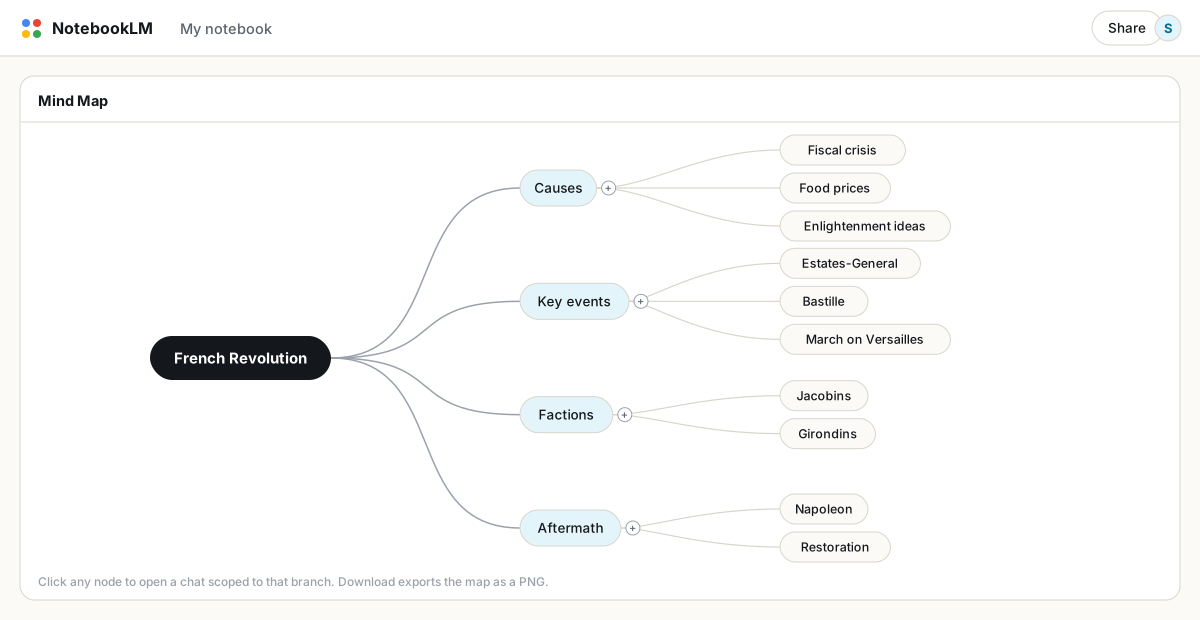
Klicke im Studio-Panel auf Mindmap. NotebookLM erstellt ein verzweigtes Diagramm der Konzepte aus deinen ausgewählten Quellen. Zoome und klappe Zweige ein, klicke auf einen Knoten, um einen auf dieses Thema eingegrenzten Chat zu öffnen, und nutze die Download-Schaltfläche, um die aktuelle Ansicht als PNG zu exportieren.
Das Klicken auf Knoten ist die eigentliche Funktion
Klickst du auf einen Knoten, öffnet NotebookLM eine Chatfrage, die auf diesen Zweig eingegrenzt ist. Das verändert, wie du ein großes Notebook erkundest: Statt dir Fragen aus einem leeren Eingabefeld auszudenken, durchsuchst du die Map, findest den Zweig, der dich interessiert, und gehst tiefer. Bei einem Notebook mit fünfzig Quellen kommt das einem Inhaltsverzeichnis, das alles abdeckt, am nächsten.
Die Map als Lückenbericht lesen
Die Map wird aus deinen Quellen erzeugt, deshalb ist ihre Form aufschlussreich. Ein Zweig mit nur einem dünnen Ästchen, wo du ein dichtes Blätterdach erwartet hättest, bedeutet, dass dein Notebook dieses Thema kaum abdeckt. Studierende nutzen das, um die Vorlesung zu finden, die sie verpasst haben; Forschende nutzen es, um zu entscheiden, welche Quellen als Nächstes fehlen; Autorinnen und Autoren wenden es auf die eigenen Entwürfe an, um zu sehen, welcher Nebenstrang unterentwickelt ist. Die schwachen Zweige sind deine To-do-Liste.
Eine bessere Map bekommen
- Benenne Quellen zuerst um. Die Titel der Quellen fließen in die Map ein. Beschreibende Namen erzeugen eine deutlich bessere Zweigstruktur als
document(3).pdf. - Grenze mit Checkboxen ein. Eine Map aus zwei ausgewählten Quellen ist enger und tiefer als eine Map aus allen fünfzig. Erzeuge lieber mehrere eingegrenzte Maps als eine riesige.
- Klappe konsequent ein. Verberge die Zweige, die du schon kennst. Was übrig bleibt, ist der Teil des Materials, den du noch nicht verinnerlicht hast.
Exportieren und teilen
Die Download-Schaltfläche exportiert ein PNG der Map im aktuell aufgeklappten Zustand — klappe also den unnötigen Teil vorher ein. Jeder, mit dem du das Notebook teilst, kann die interaktive Map selbst öffnen. Für eine Dokumentversion derselben Struktur erzeuge aus denselben Quellen einen Study Guide oder ein Briefing-Dokument und exportiere es als PDF; Map und Dokument decken beide bevorzugten Arten des Wiederholens ab.
Grenzen, die man kennen sollte
- Es gibt keine Neuerzeugung an Ort und Stelle. Haben sich die Quellen geändert, lösche die Map und erzeuge eine neue.
- Mindmaps sind in der mobilen App nicht verfügbar; das ist eine Desktop-Funktion.
- Kostenlose Konten können 10 Mindmaps pro Tag erzeugen, Pro 100. Eingegrenztes Neu-Erzeugen verbraucht dieses Kontingent schneller, als man denkt.
FAQ
Wie erstelle ich eine Mindmap in NotebookLM?
Öffne dein Notebook und klicke auf die Kachel Mindmap im Studio-Panel. Die Map wird aus den Quellen erzeugt, die aktuell im Quellen-Panel ausgewählt sind.
Kann ich eine NotebookLM-Mindmap bearbeiten?
Du kannst Zweige auf- und zuklappen, aber keine Knoten hinzufügen oder bearbeiten. Um den Inhalt zu ändern, passe die Quellenauswahl an und erzeuge die Map neu.
Wie exportiere ich eine Mindmap?
Die Download-Schaltfläche speichert die aktuelle Ansicht als PNG. Klappe irrelevante Zweige vorher ein, da der Export den aufgeklappten Zustand widerspiegelt.
Ist NotebookLM dasselbe wie Gemini Notebook?
Ja. Google hat NotebookLM im Juli 2026 in Gemini Notebook umbenannt — es ist dasselbe Produkt mit denselben Funktionen, nur unter neuem Namen.
Exportiere dein NotebookLM mit einem Klick
Kostenlose Chrome-Erweiterung. PDF, Word und Markdown. Auf deinem Gerät gerendert — nichts wird hochgeladen.