NotebookLM für Schreibende: ein Kontinuitäts-Lektor, kein Co-Autor
Lade dein eigenes Manuskript und deine Weltnotizen hoch, und NotebookLM wird zu etwas Nützlicherem als einem Brainstorming-Partner: einer Kontinuitätsprüfung, die nie vergisst, was du in Kapitel drei geschrieben hast.
NotebookLM wurde im Juli 2026 in Gemini Notebook umbenannt. Dieser Ratgeber behandelt dasselbe Produkt unter dem neuen Namen — alles Folgende gilt unabhängig davon, ob du es als NotebookLM oder als Gemini Notebook kennst.
Die Story-Bibel als Notebook aufbauen
Lade deine Entwurfskapitel, Figurenprofile, Weltregeln und alle Recherchedokumente als Quellen hoch. Benenne jedes Kapitel aussagekräftig (Kap12 – Der Verrat schlägt entwurf_v7.docx), denn diese Benennung wird zum Rückgrat jeder Mindmap und jedes Zitats, das du später erzeugst.
Kontinuitätsprüfung ist der eigentliche Nutzen
- „Fasse alles zusammen, was über die Vorgeschichte von [Figur] etabliert wurde, in der Reihenfolge, in der es im Manuskript auftaucht.“
- „Wo widerspreche ich im Entwurf den Regeln des Magiesystems, die ich in meinen Notizen festgelegt habe?“
- „Liste jede körperliche Beschreibung von [Figur] über alle Kapitel hinweg auf. Markiere jede Unstimmigkeit.“
- „Was legt das Manuskript über die Zeitlinie zwischen Kapitel 4 und Kapitel 9 fest? Gibt es Lücken oder Widersprüche?“
Hier verdient sich NotebookLM seinen Platz im Schreibprozess, denn es liest schneller und erinnert sich präziser als du selbst nach der vierzigsten Überarbeitung. Ein menschlicher Lektor erkennt weiterhin Tonfall und Tempo; NotebookLM erkennt die Augenfarbe, die sich zwischen Kapitel sechs und neunzehn geändert hat.
Mindmaps als Kontinuitäts-Dashboard
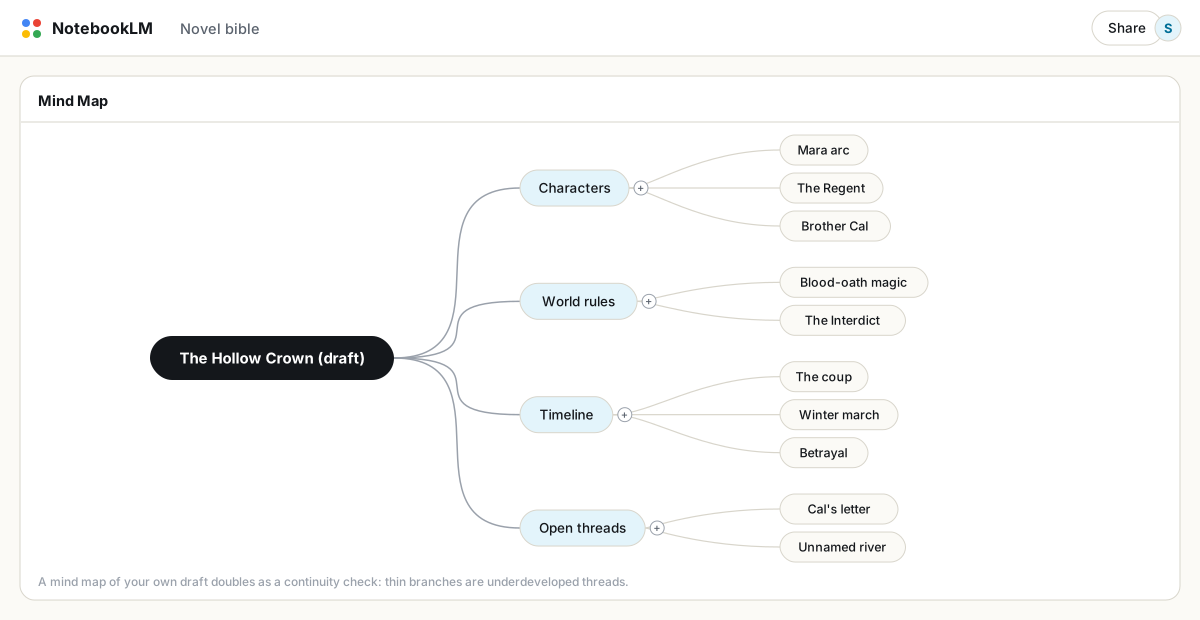
Erzeuge eine Mindmap deines eigenen Manuskripts und lies sie wie eine Gliederung: Ein dünner Ast unter „offene Handlungsstränge“ ist ein Nebenstrang, den du eingeführt und dann vergessen hast aufzulösen. Klick auf einen beliebigen Knoten, um einen auf diesen Strang begrenzten Chat zu öffnen, und frag direkt, ob er sich später auszahlt.
Fundiertes Brainstorming
Die nützliche Version von Brainstorming ist hier eng gefasst, nicht offen: Frag nach Optionen, die zu bereits etablierten Regeln deiner Welt passen. „Schlage fünf Flussnamen vor, die walisisch klingen und Größe ausstrahlen, passend zu den Namenskonventionen in meinen Weltnotizen.“ „Schlage drei Wege vor, um in Kapitel 4 zu zeigen, dass diese Figur unzuverlässig ist, ohne etwas zu widersprechen, das über sie bereits etabliert wurde.“ Fundierte Vorschläge respektieren deinen Kanon; offene „gib mir Handlungsideen“-Prompts kennen deinen Kanon meist nicht gut genug, um nützlich zu sein.
Was es nicht gut kann
- Kritik ist uneinheitlich. Es kann faktische Widersprüche zuverlässig markieren. Ob eine Szene wirklich gut ist, gut getaktet ist oder emotional trägt, zu beurteilen, ist nicht seine Stärke; behalte dafür menschliche Testleserinnen und Testleser.
- Es vertauscht gelegentlich Figuren, besonders in langen Manuskripten mit vielen ähnlich klingenden Namen. Behandle jede „Tatsache“ über eine Figur, die sich falsch anfühlt, als prüfenswert.
- Es ist kein Schreibwerkzeug. Dieser Workflow behandelt NotebookLM als reine Analyse von dem, was du bereits geschrieben hast, nicht als etwas, das deine Prosa erzeugt.
Über die Seite hinaus
Eine Videoübersicht eines Kapitels kann als grobes visuelles Moodboard dienen, wenn du pitchst oder Verlage anschreibst, und eine Audioübersicht deines eigenen Entwurfs, mit dem Prompt „kritisiere das wie zwei erfahrene Lektoren“, liefert eine seltsame, aber manchmal wirklich nützliche erste Rückmeldung, bevor du es an einen Menschen schickst. Wenn es Zeit ist, eine saubere Kopie zu teilen, exportiere Kapitel nach Word oder als PDF mit erhaltener Formatierung.
FAQ
Kann NotebookLM meinen Roman auf Kontinuitätsfehler prüfen?
Ja. Lade deinen Entwurf und deine Weltnotizen als Quellen hoch und stell gezielte Fragen zu bestimmten Figuren, Zeitlinien oder Regeln. Es erkennt faktische Widersprüche zuverlässiger, als es die Prosaqualität beurteilt.
Schreibt NotebookLM meine Geschichte für mich?
Es wird besser als reine Analyse dessen genutzt, was du bereits geschrieben hast. Fundiertes, an Bedingungen gebundenes Brainstorming funktioniert gut; offene Handlungsgenerierung ignoriert deinen etablierten Kanon meist.
Ist mein Manuskript sicher, wenn ich es zu NotebookLM hochlade?
Google gibt an, dass hochgeladene Inhalte nicht zum Training seiner Modelle verwendet werden. Wenn dir Vertraulichkeit wichtig ist, teile das Notebook nicht öffentlich und erwäge für zusätzlichen Datenschutz ein Workspace-Konto.
Ist NotebookLM dasselbe wie Gemini Notebook?
Ja. Google hat NotebookLM im Juli 2026 in Gemini Notebook umbenannt — dasselbe Produkt, dieselben Funktionen, nur ein neuer Name.
Exportiere dein NotebookLM mit einem Klick
Kostenlose Chrome-Erweiterung. PDF, Word und Markdown. Auf deinem Gerät gerendert — nichts wird hochgeladen.