NotebookLM mind map: एक पोस्टर नहीं, नेविगेशन टूल
ज़्यादातर लोग एक mind map बनाते हैं, उसे दस सेकंड देखते हैं और आगे बढ़ जाते हैं। यह असल मुद्दा चूक जाता है: हर नोड आपके स्रोतों में जाने का एक क्लिक करने योग्य रास्ता है, और मैप की बनावट यह बताती है कि आपकी नोटबुक में क्या कमी है।
जुलाई 2026 में NotebookLM का नाम बदलकर Gemini Notebook कर दिया गया। यह गाइड उसी उत्पाद को उसके नए नाम के साथ कवर करती है — नीचे दी गई हर बात लागू होती है, चाहे आप इसे NotebookLM के नाम से जानें या Gemini Notebook के नाम से।
Studio पैनल में Mind Map पर क्लिक करें। NotebookLM आपके चुने हुए स्रोतों में मौजूद अवधारणाओं का एक शाखाओं वाला डायग्राम बनाता है। ज़ूम करें और शाखाएं समेटें, किसी भी नोड पर क्लिक करके उस विषय तक सीमित एक चैट खोलें, और मौजूदा व्यू को PNG के रूप में एक्सपोर्ट करने के लिए डाउनलोड बटन इस्तेमाल करें।
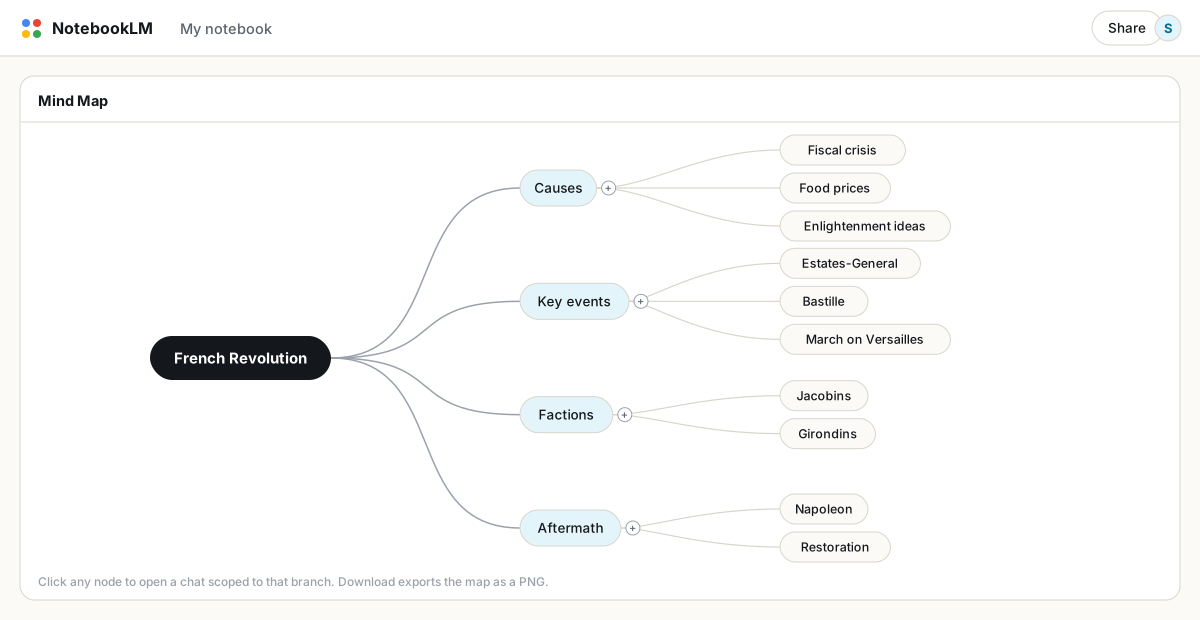
नोड्स पर क्लिक करना ही असली फ़ीचर है
किसी नोड पर क्लिक करें और NotebookLM उस शाखा तक सीमित एक चैट सवाल खोल देता है। इससे यह बदल जाता है कि आप एक बड़ी नोटबुक को कैसे एक्सप्लोर करते हैं: खाली इनपुट बॉक्स से सवाल गढ़ने की बजाय, आप मैप ब्राउज़ करते हैं, अपनी दिलचस्पी वाली शाखा ढूंढते हैं, और उसी में गहराई से उतर जाते हैं। पचास स्रोतों वाली नोटबुक के लिए यह हर चीज़ को कवर करने वाली विषय-सूची के सबसे नज़दीक है।
मैप को कमियों की रिपोर्ट की तरह पढ़ें
मैप आपके स्रोतों से जनरेट होता है, इसलिए इसकी बनावट निदान का काम करती है। जहां आपने घनी शाखा की उम्मीद की थी वहां अगर सिर्फ़ एक पतली टहनी दिखे, तो इसका मतलब है कि आपकी नोटबुक उस विषय को मुश्किल से कवर करती है। छात्र इसका इस्तेमाल यह पता लगाने के लिए करते हैं कि उन्होंने कौन-सी क्लास छोड़ी; शोधकर्ता इससे तय करते हैं कि आगे किस पर स्रोत जुटाएं; लेखक इसे अपने ड्राफ़्ट पर चलाकर देखते हैं कि कौन-सा उपकथानक अधूरा रह गया है। कमज़ोर शाखाएं ही आपकी टू-डू लिस्ट हैं।
एक बेहतर मैप पाना
- पहले स्रोतों के नाम बदलें। मैप स्रोत के शीर्षकों से बनता है। वर्णनात्मक नाम
document(3).pdfजैसे नामों से कहीं बेहतर शाखा-संरचना देते हैं। - चेकबॉक्स से स्कोप तय करें। दो चुने हुए स्रोतों का मैप सभी पचास का मैप बनाने से कहीं ज़्यादा टाइट और गहरा होता है। एक बड़े मेगा-मैप की बजाय कई स्कोप किए हुए मैप बनाएं।
- बेझिझक शाखाएं समेटें। जो शाखाएं आप जानते हैं उन्हें समेट दें। जो बचता है वही सामग्री का वह हिस्सा है जिसे आपने अभी तक आत्मसात नहीं किया।
एक्सपोर्ट करना और साझा करना
डाउनलोड बटन मैप को उसकी मौजूदा फैली हुई हालत में PNG के रूप में एक्सपोर्ट करता है, इसलिए एक्सपोर्ट करने से पहले फ़ालतू शाखाएं समेट दें। जिस किसी के साथ भी आप नोटबुक साझा करते हैं वह खुद इंटरैक्टिव मैप खोल सकता है। इसी संरचना के दस्तावेज़ी संस्करण के लिए, उन्हीं स्रोतों से एक स्टडी गाइड या ब्रीफ़िंग डॉक बनाएं और उसे PDF में एक्सपोर्ट करें; मैप और दस्तावेज़ मिलकर रिव्यू के दोनों पसंदीदा तरीक़े कवर कर देते हैं।
जानने लायक़ सीमाएं
- इन-प्लेस पुनर्जनन नहीं है। अगर स्रोत बदल गए हैं, तो मैप डिलीट करें और एक नया बनाएं।
- मोबाइल ऐप में mind map उपलब्ध नहीं हैं; यह एक डेस्कटॉप फ़ीचर है।
- मुफ़्त अकाउंट रोज़ाना 10 mind map बना सकते हैं, Pro 100। स्कोप की हुई पुनर्जनन इस सीमा को अंदाज़े से कहीं तेज़ी से ख़त्म कर देती है।
FAQ
NotebookLM में mind map कैसे बनाएं?
अपनी नोटबुक खोलें और Studio पैनल में Mind Map टाइल पर क्लिक करें। मैप उन स्रोतों से जनरेट होता है जो फ़िलहाल Sources पैनल में चुने हुए हैं।
क्या मैं किसी NotebookLM mind map को एडिट कर सकता हूं?
आप शाखाओं को फैला और समेट सकते हैं, लेकिन नोड जोड़ या एडिट नहीं कर सकते। सामग्री बदलने के लिए, स्रोत चयन बदलें और दोबारा जनरेट करें।
मैं mind map एक्सपोर्ट कैसे करूं?
डाउनलोड बटन मौजूदा व्यू को PNG के रूप में सेव करता है। पहले अनावश्यक शाखाएं समेट दें, क्योंकि एक्सपोर्ट फैली हुई हालत को ही दर्शाता है।
क्या NotebookLM और Gemini Notebook एक ही हैं?
हां। Google ने जुलाई 2026 में NotebookLM का नाम बदलकर Gemini Notebook कर दिया — यह वही उत्पाद है, वही फ़ीचर हैं, बस नाम नया है।
एक क्लिक में अपना NotebookLM एक्सपोर्ट करें
मुफ़्त Chrome एक्सटेंशन। PDF, Word और Markdown। आपकी मशीन पर ही रेंडर होता है — कुछ भी अपलोड नहीं होता।