NotebookLM com Obsidian ou Notion: um fluxo de mão dupla
Seu app de notas é onde as ideias vivem a longo prazo. O NotebookLM é onde você as interroga com citações. Um não substitui o outro, então veja como mover material nas duas direções sem perder a formatação.
O NotebookLM foi renomeado para Gemini Notebook em julho de 2026. Este guia trata do mesmo produto sob o novo nome — tudo abaixo continua valendo, seja você conhecer a ferramenta como NotebookLM ou como Gemini Notebook.
Notas para dentro: exporte uma pasta de notas como um único PDF mesclado, ou envie arquivos Markdown diretamente; o NotebookLM aceita .md nativamente. Respostas para fora: a extensão gratuita NotebookLM to PDF exporta qualquer chat, nota ou relatório como Markdown, que cola de forma limpa no Obsidian ou no Notion.
Levando um vault do Obsidian para o NotebookLM
- Mescle uma pasta, ou envie os arquivos um por um. Uma ferramenta de exportação de vault que combina uma pasta de notas em um único PDF funciona bem para uma coleção temática, e também contorna o limite de quantidade de fontes; cem notas pequenas viram uma só fonte. Para conjuntos menores, enviar arquivos
.mdindividuais preserva os títulos de forma mais limpa. - Mantenha a pasta restrita ao tema. Um vault costuma abranger anos e dezenas de assuntos sem relação entre si. Exporte só as notas relevantes para a pergunta que você está realmente fazendo; um notebook montado a partir do vault inteiro responde tudo de forma vaga e nada com precisão.
- Renomeie antes de enviar. Nomes de arquivo do Obsidian costumam ser datados ou crípticos. Uma passada rápida de renomeação para algo descritivo vale a pena da mesma forma que vale para qualquer outra fonte; veja o guia de fontes.
Levando páginas do Notion para o NotebookLM
A exportação do Notion gera Markdown ou PDF por página ou por workspace. Exporte as páginas relevantes e depois envie os arquivos resultantes do mesmo jeito que qualquer outra fonte em documento. Não existe sincronização ao vivo em nenhuma das direções, então trate uma importação como um retrato do momento: reexporte e reenvie depois de edições significativas.
Trazendo as respostas de volta para fora
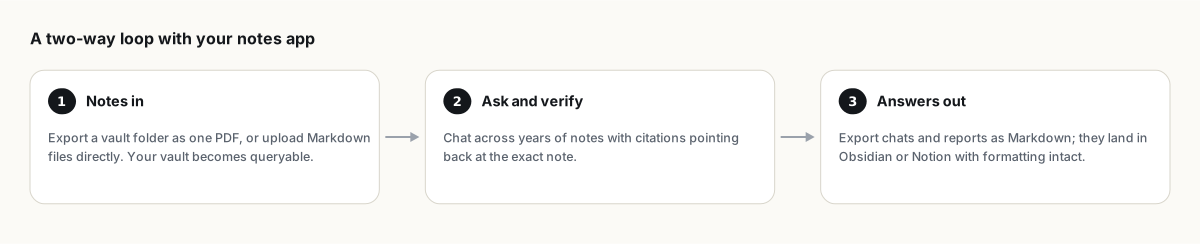
É aqui que a maioria das pessoas emperra, porque o NotebookLM não tem um botão nativo de exportação em Markdown nas respostas do chat. A extensão NotebookLM to PDF resolve isso: exporte qualquer resposta de chat, nota ou relatório como Markdown, com títulos e blocos de código intactos, e depois solte o arquivo direto no seu vault ou cole numa página do Notion. Mecânica completa em NotebookLM to Markdown.
Um fluxo que vale a pena montar
- Mantenha seu app de notas como o arquivo permanente. É onde as coisas ficam guardadas por anos.
- Traga uma fatia relevante para o NotebookLM quando precisar fazer perguntas que cruzam várias notas com citações, algo que nenhum dos dois apps faz nativamente.
- Salve as respostas úteis como notas dentro do NotebookLM ao longo do caminho.
- Exporte a síntese finalizada de volta para Markdown e arquive no seu vault, para que da próxima vez que você buscar nas próprias notas, esse material novo já esteja lá.
Nada aqui sincroniza automaticamente. Arquivos enviados são retratos de um momento (arquivos nativos do Google Drive são a única exceção, sincronizando automaticamente); se você continua consultando o mesmo vault regularmente, faça backup do notebook inteiro periodicamente para que uma reexportação nunca signifique começar do zero.
Perguntas frequentes
O NotebookLM sincroniza diretamente com o Obsidian ou o Notion?
Não existe sincronização nativa. As notas entram como envio de arquivos (Markdown ou um PDF mesclado) e as respostas saem via exportação em Markdown, ambos como passos manuais e repetíveis.
O NotebookLM preserva a formatação Markdown na exportação?
A extensão gratuita NotebookLM to PDF exporta chats, notas e relatórios como Markdown limpo, com títulos e blocos de código intactos, prontos para colar em qualquer app de notas.
Importar o vault inteiro vai bater no limite de fontes?
Possivelmente. Mesclar uma pasta em um único PDF, ou enviar só as notas relevantes para a sua pergunta atual, mantém você bem abaixo do teto. Veja os limites de fonte para mais truques de consolidação.
O NotebookLM é o mesmo que o Gemini Notebook?
Sim. O Google renomeou o NotebookLM para Gemini Notebook em julho de 2026 — é o mesmo produto, com os mesmos recursos, só com um nome novo.
Exporte seu NotebookLM em um clique
Extensão gratuita do Chrome. PDF, Word e Markdown. Renderizado na sua máquina — nada é enviado para a nuvem.