NotebookLM for meetings: from transcript to action items
Meeting notes rot the moment everyone leaves the room. Dropping transcripts into one running notebook turns them into a searchable record that gets more useful the longer you keep it.
NotebookLM was renamed Gemini Notebook in July 2026. This guide covers the same product under its new name — everything below still applies whether you know it as NotebookLM or Gemini Notebook.
Set up one notebook per recurring meeting series
Not one notebook for every meeting you attend; one per project or standing meeting. A weekly product sync accumulates into a single notebook over a quarter, and by week eight it can answer questions no individual transcript could: what got decided and later reversed, which risk keeps resurfacing, who actually owns the thing that is three weeks late.
The extractor template
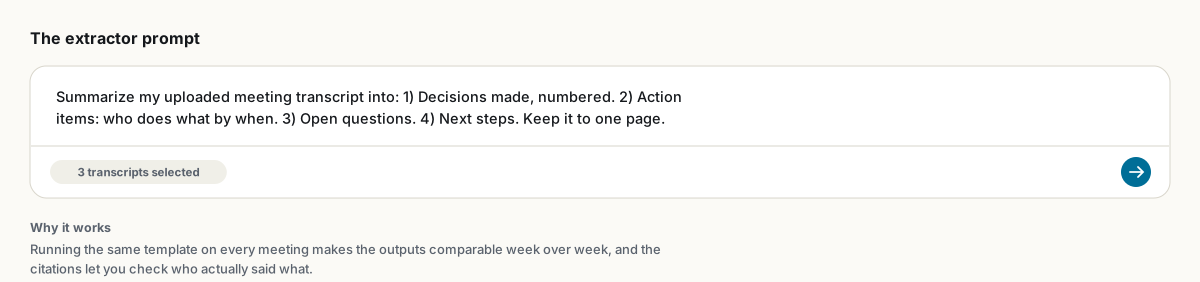
Summarize my uploaded meeting transcript into: 1) Decisions made, numbered. 2) Action items: who does what, by when. 3) Open questions. 4) Next steps. Keep it to one page.Using the exact same template every week is deliberate, not lazy. Consistent structure is what makes outputs comparable across meetings later, and comparability is where the real value shows up.
Getting transcripts in
- Meeting platforms with built-in transcription export a text file directly; upload it as-is.
- For a fully local, no-subscription pipeline, record the meeting and transcribe it with a local Whisper install, keeping audio off third-party clouds entirely.
- NotebookLM also accepts audio files directly as a source if you would rather skip a separate transcription step.
Cross-meeting questions worth asking monthly
- "What themes recur across the last eight meetings?"
- "List anything that was decided and then later reversed or contradicted, with dates."
- "Which action items were assigned more than once without ever being marked complete?"
- "Summarize how the team's stated priorities shifted over this quarter."
A mind map of a full quarter's transcripts is also worth generating once a month; recurring branches are recurring problems.
The executive-brief variant
For catching up on meetings you missed, or briefing someone before theirs: centralize the relevant transcripts and agendas in a notebook, then generate an Audio Overview with a focused prompt: "Extract every action item, owner and deadline, and the biggest open risk. The listener has 20 minutes before their own meeting on this topic." Twenty minutes of audio beats an hour of reading back-catalogued notes.
Share the notebook as Viewer so teammates can query the meeting history themselves instead of asking you to remember. For the weekly summary itself, export the chat answer to PDF or Word and drop it wherever your team actually reads updates.
FAQ
Can NotebookLM summarize a meeting transcript?
Yes. Upload the transcript as a source and ask for decisions, action items, open questions and next steps. A consistent prompt template makes outputs comparable across meetings.
Should every meeting get its own notebook?
No. Group related recurring meetings into one notebook so it can answer questions across sessions, like what recurs or what got quietly reversed.
How do I record meetings without a paid transcription tool?
Record locally and transcribe with a free tool like Whisper, then upload the text file to NotebookLM. Audio files also work directly as sources.
Is NotebookLM the same as Gemini Notebook?
Yes. Google renamed NotebookLM to Gemini Notebook in July 2026 — it's the same product, same features, just a new name.
Xuất NotebookLM của bạn chỉ với một cú nhấp
Tiện ích Chrome miễn phí. PDF, Word và Markdown. Kết xuất trên máy của bạn — không tải gì lên.