Beating the NotebookLM source limit without paying
Fifty sources per notebook sounds like plenty until your literature review hits paper number fifty-one. The per-source cap is 500,000 words, and that asymmetry is the loophole every workaround exploits.
NotebookLM was renamed Gemini Notebook in July 2026. This guide covers the same product under its new name — everything below still applies whether you know it as NotebookLM or Gemini Notebook.
The limit is 50 sources per notebook on the free plan (300 on Pro), but each source can hold 500,000 words on any plan. So the play is consolidation: merge related files into one document, use Google Docs with tabs, or distill sources into notes and convert those back into compact sources.
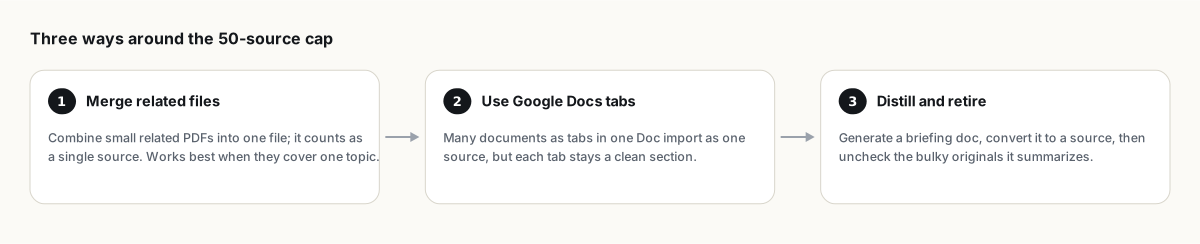
Method 1: merge related files
Combine related PDFs into one file with any free PDF merger and upload the result as a single source. Fifty small papers become five themed bundles, and you have used five slots. A 500,000-word budget per source absorbs a lot of papers.
The tradeoff is citation granularity: answers now cite "Bundle 3" rather than an individual paper, and you dig for which paper inside the bundle said it. This hurts most in academic work where attribution matters. Merge documents that cover one unified topic (all coverage of the same law, all docs for the same product) and keep documents you will need to cite individually as their own sources.
Method 2: Google Docs tabs
A Google Doc with ten tabs imports as one source, but each tab remains a cleanly separated section with its own heading, so answers stay legible. This is the tidiest version of merging: no PDF tooling, easy to extend later, and since native Drive files sync automatically, the source updates when you edit the doc. People consolidating meeting notes and research clippings this way report cutting source counts by well over half.
Method 3: distill and retire
- Generate a briefing doc or detailed summary from a group of bulky sources.
- Save it as a note, then use Convert to source so it becomes queryable.
- Untick or remove the originals it summarizes. The distilled version keeps answering; the slots come back.
This one compounds, because the distillation is often a better source than the originals: denser, deduplicated, in your framing. The risk is obvious though. A summary loses detail, so keep the originals somewhere (Drive, or an exported backup) rather than deleting your only copy of anything.
Or split by theme instead
Sometimes the honest answer is that one notebook is trying to be two. Answer quality degrades when unrelated sources compete for context, so a 70-source everything-notebook would give worse answers even if the cap allowed it. Community consensus puts the sweet spot around 5 to 25 sources per topic. Splitting has one real cost, since notebooks cannot query each other; the workaround is attaching several notebooks to one Gemini conversation when you need cross-notebook synthesis.
When paying is simply correct
If you are regularly juggling consolidation logistics instead of doing your actual work, the Pro tier's 300 sources per notebook costs less than the time you are burning. The free vs paid breakdown has the numbers. The techniques above still apply on Pro; 300 slots also run out, just later.
FAQ
How many sources does NotebookLM allow?
50 per notebook on the free plan, 100 on Plus, 300 on Pro, and up to 600 on the top Ultra tier. Every plan allows 500,000 words or 200 MB per individual source.
Does merging PDFs hurt answer quality?
Answer quality holds up; citation precision is what suffers, since references point at the merged file. Merge single-topic groups and keep individually citable documents separate.
Is there a total storage limit across notebooks?
The practical limits are per notebook (source count) and per source (500k words / 200 MB). Free accounts can create up to 100 notebooks.
Is NotebookLM the same as Gemini Notebook?
Yes. Google renamed NotebookLM to Gemini Notebook in July 2026 — it's the same product, same features, just a new name.
클릭 한 번으로 NotebookLM 내보내기
무료 Chrome 확장 프로그램. PDF, Word, Markdown 지원. 내 컴퓨터에서 직접 렌더링되며 업로드되는 것은 없습니다.