Deep Research in NotebookLM: filling a notebook from the open web
NotebookLM's biggest historical limitation was that it only knew what you fed it. Deep Research changes the economics: describe a question, let it browse the web for minutes, and import a cited report plus its sources in one click.
NotebookLM was renamed Gemini Notebook in July 2026. This guide covers the same product under its new name — everything below still applies whether you know it as NotebookLM or Gemini Notebook.
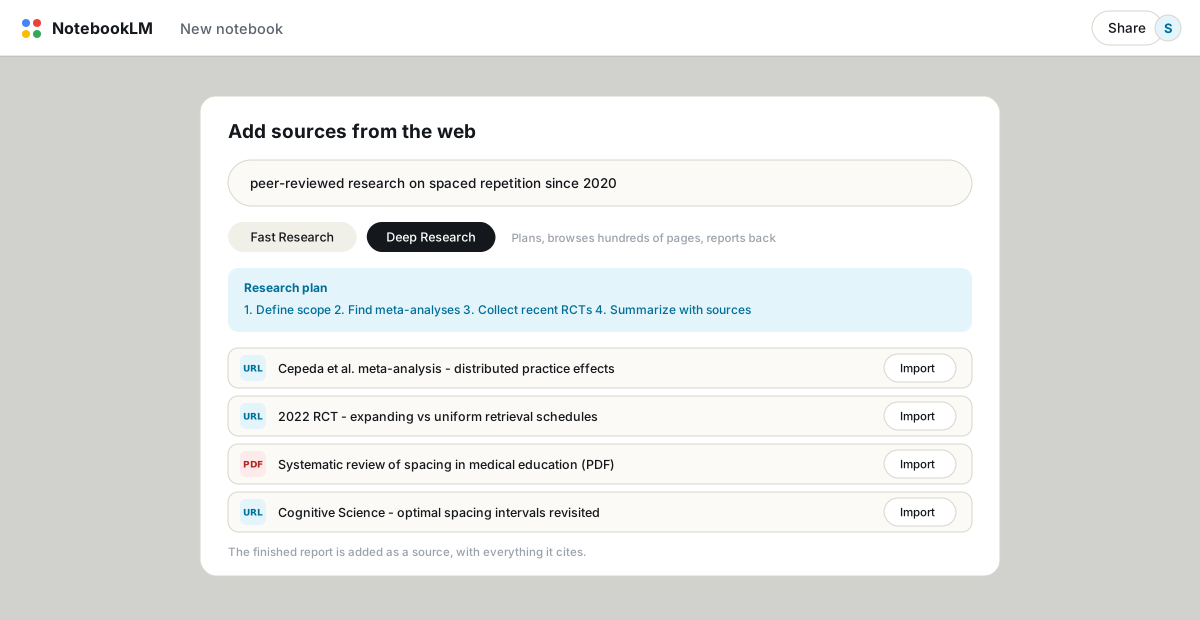
In the Sources panel, click Add, choose Web, type your research question, and pick Fast Research (a quick scan that suggests importable sources) or Deep Research (plans a search, browses hundreds of pages in the background, and returns a source-grounded report). Import the report and it becomes a queryable source along with everything it cites.
Fast vs Deep, and when each fits
- Fast Research takes seconds and suggests a handful of relevant web sources with short annotations. Use it to seed a new notebook or fill an obvious gap.
- Deep Research takes minutes. It writes a research plan, browses widely, and produces a structured report with citations. Use it when the question is genuinely open ("what does the evidence say about X since 2020") rather than a lookup.
The workflow that makes it useful
- Ask a real question, not a topic. "Spaced repetition" returns an encyclopedia entry. "What do meta-analyses since 2020 say about optimal spacing intervals for language learning?" returns something you can use.
- Let it run in the background. You can keep working in the notebook; the report lands in the source picker when ready.
- Import selectively. The report arrives with its cited sources listed. Skim them and import the ones that hold up; you are curating a notebook, not hoarding.
- Then interrogate it like any source. The report is now queryable with citations. Cross-examine it against your own documents: "where does the imported report disagree with my uploaded papers?"
Quotas, and a caution
Deep Research is the most tightly rationed feature in the app: 10 runs per month on the free tier, 20 per day on Pro. That rationing is a hint about cost, so spend runs on questions that deserve them.
The caution: a Deep Research report is machine-written from web pages of uneven quality. It arrives looking authoritative, with the same citation chips as everything else. Click through more of them than usual, especially for medical, legal or financial questions, and remember that the report reflects what was findable on the open web, not what is true. The citations and accuracy guide applies double here.
Where it shines
- Starting a literature review before you have collected papers; the research paper workflow builds on it.
- Competitive scans: "how do the main players in [market] position their pricing?" imports a comparison you can then query.
- Unfamiliar territory: a primer report plus its sources beats an hour of unstructured googling, and stays queryable afterward.
A good Deep Research report is worth keeping outside Google too. Export it to PDF or Markdown once you have verified the parts you rely on.
FAQ
How many Deep Research runs do I get?
10 per month on the free plan, 3 per day on the Plus tier, 20 per day on Pro, and more on Ultra plans. Fast Research is far less constrained.
How long does Deep Research take?
Minutes rather than seconds; it browses in the background and the report appears when finished. Fast Research returns suggestions almost immediately.
Can NotebookLM search the web during normal chat?
Not on standard plans; chat answers come only from your sources. Deep Research is how web material gets in, after which it is queryable like any upload.
Is NotebookLM the same as Gemini Notebook?
Yes. Google renamed NotebookLM to Gemini Notebook in July 2026 — it's the same product, same features, just a new name.
Экспортируйте свой NotebookLM в один клик
Бесплатное расширение Chrome. PDF, Word и Markdown. Всё формируется на вашем устройстве — ничего не загружается в сеть.