Syncing Zotero with NotebookLM (Gemini Notebook): the tools that exist, and where they break
Google and Zotero have never built an official bridge between the two, so a small ecosystem of community tools has grown to fill the gap: browser extensions, a Zotero plugin, and a command-line tool that push citations and PDFs one way, pull generated notes back the other, or both. We checked each one's current GitHub issue tracker and release history rather than trusting the original announcement threads, which turned out to matter: several widely cited bugs were fixed months ago, and the failure mode that actually bites readers today isn't the one most forum threads describe.
NotebookLM was renamed Gemini Notebook in July 2026. The tools below still use the old "NotebookLM" name, since that is what they were built and published under; everything here applies whether you know the product by its old name or its new one.
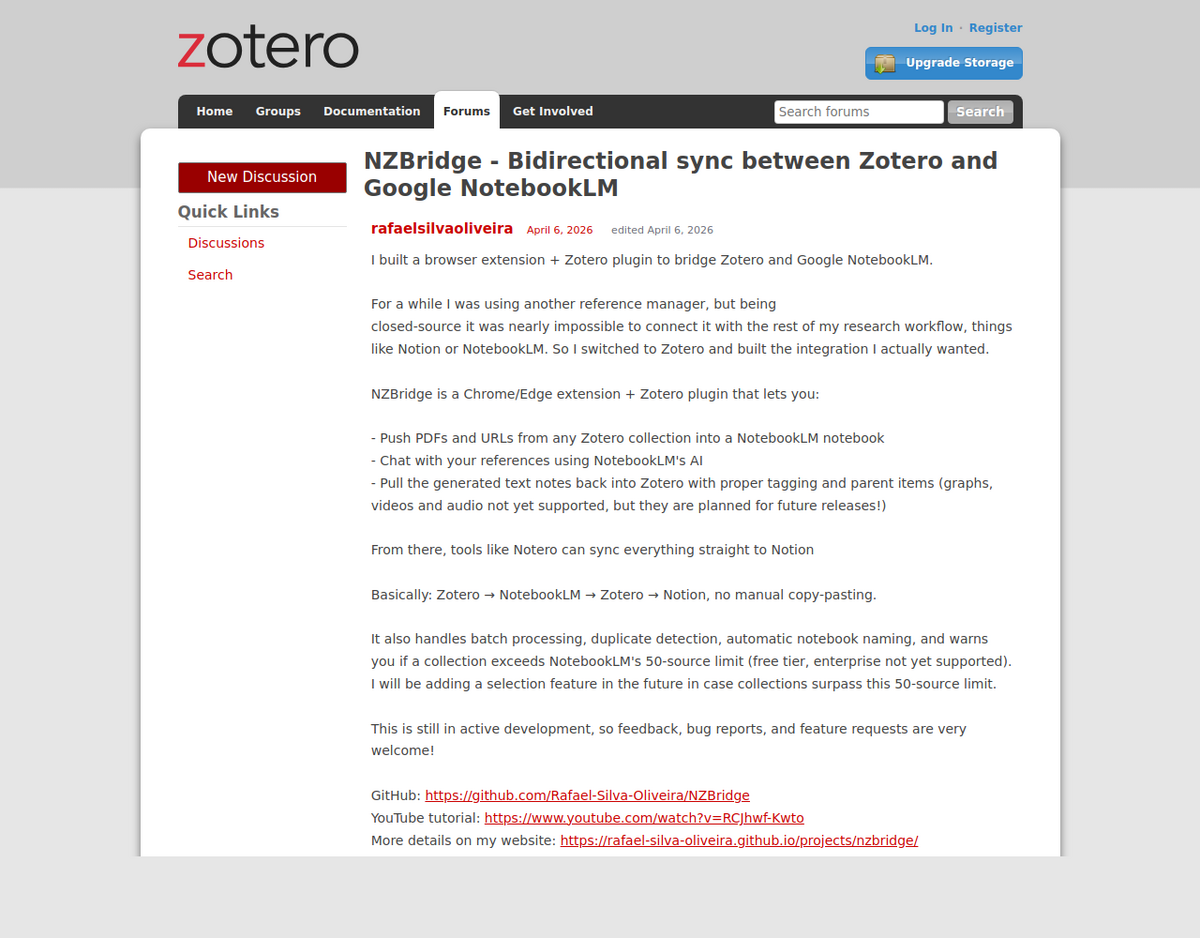
There is no native sync between Zotero and Gemini Notebook. Four community-built tools fill the gap: NZBridge (bidirectional, Chrome/Edge extension plus a Zotero plugin), NotebookLM to Zotero (one-way export, Chrome extension, RIS format), Zotero Gemini Notebook, formerly Zotero NotebookLM (one-way export, Zotero plugin plus a Chrome companion), and ilmzot (one-way, command-line, Python). All four are independent, unofficial projects maintained by individual developers, not Zotero or Google.
The failure mode that actually matters today is a browser permission block, not a sync bug. Starting with Chrome/Edge 142, a security feature called Local Network Access silently stops these extensions from reaching Zotero's local connector until you grant permission manually. Older complaints about silent sync failures and macOS-specific bugs, the ones that dominate the original 2026 forum threads, were fixed by NZBridge's developer within weeks of being reported; don't let a six-month-old thread send you down the wrong troubleshooting path.
Gemini Notebook's per-notebook source cap (50 on the free tier, 300 on Pro) applies regardless of which tool you use. A large Zotero collection will hit it; sub-collections are the standard workaround.
Why no official integration exists
Zotero is open-source with a public API built for exactly this kind of connection. Gemini Notebook is the opposite: Google has not published a general-purpose API for individual accounts (the enterprise edition is a separate product with its own access model), so every tool described here works by driving Gemini Notebook's own web interface, calling Zotero's local API from a browser extension, or both, not through a sanctioned integration on either side. That matters for reliability in two separate ways: when Google changes a button label or page layout, tools that find that button by its text can break until their developer catches up, and when Chrome or Edge tightens a browser-level security permission, as happened with Local Network Access, every extension relying on that permission breaks at once, regardless of what Google or Zotero changed.
The four tools, compared
Tool                      Direction              Install                    Notes
------------------------------------------------------------------------------
NZBridge                  Zotero <-> Notebook    Chrome/Edge ext +         v0.5.1 (Sep 2026); most
                                                  Zotero plugin             actively maintained

NotebookLM to Zotero       Notebook -> Zotero     Chrome extension only      3,000 users, 3.7/5 (3
                           (RIS export)                                      ratings); needs a Zotero
                                                                              API key

Zotero Gemini Notebook     Zotero -> Notebook     Zotero plugin +           v0.5.0 (Sep 2026); added
(fka Zotero NotebookLM)                           Chrome companion ext       an opt-in AI-assistant
                                                                              (MCP) bridge

ilmzot                     Zotero -> Notebook     Python package (pip)       CLI only, no GUI;
                                                                              unofficial API, PDFs
                                                                              only

Pick NZBridge for round-trip syncing, NotebookLM to
Zotero if you only need generated notes catalogued back
into Zotero, Zotero Gemini Notebook if you want the push
to start from Zotero's own Tools menu and don't mind a
Chrome companion install, and ilmzot if you're comfortable
in a terminal and want a scriptable, GUI-free option.
Setting up NZBridge, the bidirectional option
NZBridge is a Chrome/Edge browser extension paired with a Zotero plugin, announced on Zotero's forums on 6 April 2026 by developer Rafael Silva Oliveira and still the most actively maintained of the four, with 17 releases since its April 2026 launch, the latest being v0.5.1 in early September 2026. It pushes PDFs and URLs from any Zotero collection into a Gemini Notebook notebook, lets you chat with those references using the notebook's AI, and pulls the generated text notes back into Zotero with tagging and parent items attached (graph, video and audio notes aren't supported yet). It also handles batch processing, duplicate detection, automatic notebook naming, and will warn you if a collection exceeds the 50-source cap on Gemini Notebook's free tier.
- Install both halves. NZBridge needs the browser extension (Chrome or Edge) and the matching Zotero plugin, both linked from the developer's GitHub repository. A plugin-only or extension-only install won't sync anything.
- Group libraries work too, not just My Library. Early versions only listed your personal library; a dedicated Library section covering group libraries shipped in v0.3.0 after a user requested it, confirmed working by a different user days later.
- Your Gemini Notebook interface must be set to English. NZBridge's own README states this as an unqualified requirement, and it's worth following as written: separate updates since added label matching for a dozen other Gemini Notebook interface languages, including a dedicated Turkish release whose own notes claim the English requirement no longer applies, but the README's prerequisites section still states English as a flat requirement with no exception listed. The project's own documentation disagrees with itself here; until that's resolved, treat English as required rather than trusting a changelog entry over the current setup instructions.
- Scope the collection before syncing, not after. If a Zotero collection is bigger than the free tier's 50-source ceiling, sync fails or gets capped rather than quietly trimming itself; build a sub-collection for the specific question you're researching, the same consolidation principle our source limits guide covers for manual uploads.
What actually breaks today
The bug reports that dominate NZBridge's original forum thread, like one user's extension logging "0 of 6 items synced" after failing to locate Gemini Notebook's "Add sources" control, and a second user's suspicion that the failure was macOS-specific, were real, but the underlying issue was fixed within about a month of being reported (the developer's tracking issue closed 7 May 2026, and the project has shipped ten further releases since). If you find that specific symptom described on an old forum post or in an AI-generated summary, treat it as resolved history rather than a current blocker.
The failure that actually matters as of this writing is different, and newer: starting with Chrome and Edge version 142, a browser security feature called Local Network Access blocks extensions from reaching localhost, where the Zotero plugin runs its local connector, until you explicitly grant permission. NZBridge's own documentation states this plainly: the feature "affects all operating systems, not just macOS," and NZBridge cannot request the permission automatically. The symptom looks exactly like a broken sync, a disconnected status indicator, an empty collection list, or a sync that times out, even though Zotero is running correctly.
- Fix the Local Network Access block first, before troubleshooting anything else: open
chrome://extensions, find NZBridge, open Details, scroll to Site settings, and set Local network access to Allow. - If collections won't load or a sync times out, this is almost always the same Local Network Access block, not a Zotero or Gemini Notebook problem.
- If a URL source won't import, switch to uploading the PDF directly. Bot verification on some publisher and news sites blocks the automated URL fetch these tools rely on.
- If you're running a build older than mid-2026, update before troubleshooting further. Group-library support and several early sync bugs were fixed within months of launch, and an outdated build will reproduce problems that are otherwise long resolved. This doesn't extend to the language requirement above, which the README still states as current regardless of build.
The other export tools
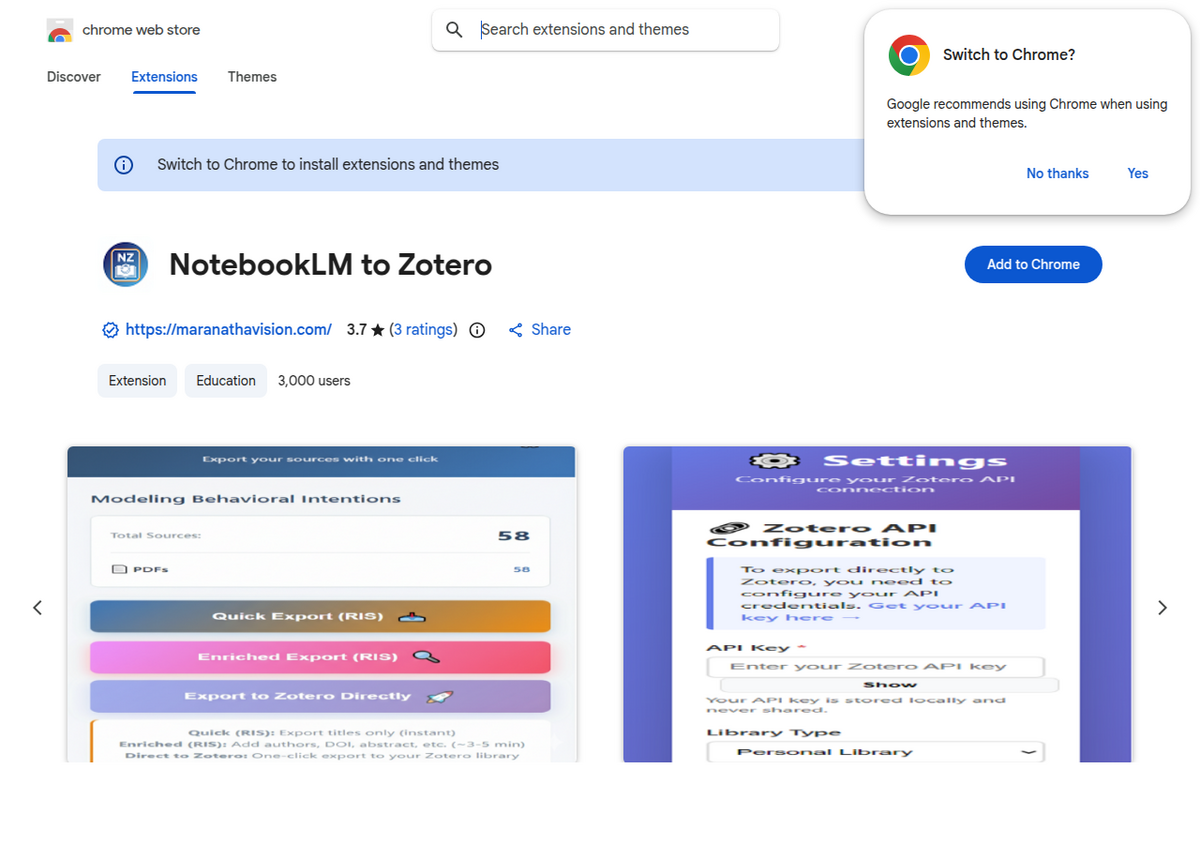
If you don't need a live round trip and only want a notebook's sources catalogued into Zotero once, NotebookLM to Zotero is a simpler, one-way Chrome extension. At 3,000 users and a 3.7-star rating from 3 reviews at the time of writing, it's a small project, worth setting expectations accordingly. It offers three export modes: Quick Export pulls titles only, almost instantly, in RIS format; Enriched Export adds authors, DOI, and abstract where available, taking roughly 3 to 5 minutes; and Export to Zotero Directly sends items straight into your library in one click, which requires generating and entering a Zotero API key in the extension's settings first (the extension states the key is stored locally and never shared, but generate a dedicated key rather than reusing one tied to other tools, standard practice for any third-party API key).
Zotero Gemini Notebook, formerly published as Zotero NotebookLM, runs the handoff from the other direction and has grown considerably since its rename: v0.4.0 added Zotero 10 support and an opt-in local bridge (MCP) that lets a connected AI coding assistant check sync status or stage attachments from a Zotero collection, without ever returning the attachment's raw file contents or private notebook data to the assistant, and the current v0.5.0 builds on that with optional Studio-prompt suggestions. Staging sources works two ways: select items in Zotero's items pane, right-click, and choose Export Selected to Gemini Notebook for a quick handoff, or go to Tools → Gemini Notebook Connector → Export to Gemini Notebook to browse the full collection tree and search by title, author, or year first. Day to day, it's a smaller, more cautious tool than NZBridge, aimed at people comfortable reading a changelog before updating.
The fourth option, ilmzot, skips browser extensions entirely: it's a Python command-line tool, installed via pip, that mirrors your Zotero collections into same-named Gemini Notebook notebooks while keeping Zotero as the source of truth. It only syncs PDFs (not URLs), only runs one way, from Zotero outward, and authenticates through an unofficial route rather than a sanctioned API, the project's own documentation is upfront that this makes it inherently fragile against Google interface changes. It suits a narrower audience than the three browser-based tools: people who already live in a terminal and want a scriptable ilmzot sync "Collection Name" command rather than a point-and-click extension.
A worked example: a 30-item literature review
Say you're reviewing 30 papers for a lit review chapter, all sitting in one Zotero collection, in either your personal library or a shared group library. A reasonable sequence: create a Zotero sub-collection containing just those 30 items (well under the 50-source free-tier ceiling, comfortably under Pro's 300), confirm Chrome or Edge's Local Network Access permission is allowed for NZBridge if you're on version 142 or newer, open a fresh Gemini Notebook notebook and let it finish loading, then run NZBridge's sync pointed at that sub-collection rather than your whole library. Favor items where you have the PDF attached in Zotero over items that are URL-only, since those sync more reliably. Once the sources are in, ask the notebook cross-reference questions your citation manager can't answer on its own, like which three papers most directly contradict each other's findings, then pull the generated notes back into Zotero so they live alongside the sources that produced them.
When not to bother
If your Zotero library changes constantly and you need guaranteed, unattended sync, none of these four tools promise that; they're actively maintained side projects, not enterprise software, built and supported by individual developers in their spare time. They suit a specific, scoped task, like getting one collection into one notebook for one research push, better than an always-on pipeline. If that's what you need, re-exporting a sub-collection by hand each time you sit down to work is slower but won't silently drop items the way an unattended automated sync might.
People also ask
Does Zotero have an official integration with NotebookLM or Gemini Notebook?
No. Neither Zotero nor Google has published an official connector. Four independent, community-built tools fill the gap: NZBridge, NotebookLM to Zotero, Zotero Gemini Notebook (formerly Zotero NotebookLM), and the command-line tool ilmzot.
Which tool syncs both directions, Zotero to NotebookLM and back?
NZBridge. It's a Chrome/Edge extension paired with a Zotero plugin that pushes PDFs and URLs from a Zotero collection into a notebook and pulls the generated notes back into Zotero with tagging intact. The other three tools only sync one direction.
Why does my Zotero sync extension show a disconnected status or an empty collection list?
As of Chrome/Edge 142, this is almost always a Local Network Access permission block, not a bug: open chrome://extensions, select the extension, open Site settings, and allow Local network access. Older reports describing a silent "0 items synced" failure were a separate, now-fixed bug from spring 2026.
Will my whole Zotero library fit in one Gemini Notebook notebook?
Only if it's under your tier's source cap, 50 on the free plan, 300 on Pro. Build a scoped sub-collection for the specific project you're working on instead of syncing an entire library at once.
Can I sync a Zotero group library, not just my personal library?
With NZBridge, yes, since v0.3.0 added a dedicated Library section covering group libraries alongside your personal one. Check which library a given sync tool supports before assuming it only works with your own collection.
Is it safe to give a Zotero sync extension my Zotero API key?
The NotebookLM to Zotero extension states the key is stored locally in your browser and never transmitted to its developer. As with any third-party tool requesting API access, generate a dedicated key rather than reusing one shared with other integrations, so you can revoke it independently if needed.
Експортуйте свій NotebookLM в один клік
Безкоштовне розширення Chrome. PDF, Word і Markdown. Обробка на вашому пристрої — нічого не завантажується в мережу.