Jenni AI review: an honest look at the AI essay writer, and the questions its marketing doesn't answer
Jenni AI's homepage now says its citations are "traceable to the source" and that it's "AI that writes from your papers, not from the web." That phrasing sounds a lot like Gemini Notebook's pitch. It is not the same tool, and the difference matters more than a features list captures. Jenni's core job is writing your sentences for you; Gemini Notebook's is answering questions about documents you chose without writing your paper at all. This review checks Jenni's current pricing and features against its own site, reads through the real complaints on Trustpilot and G2 instead of the vendor's testimonial page, runs its output through the detectors that matter, and works out where each tool actually belongs, including for the academic-integrity question that decides which one is even allowed.
Jenni AI is a paragraph-level writing tool for essays, theses and papers: it autocompletes your next sentence, inserts citations as you write, and checks whether your cited claims actually match what the source says. Free tier: 10 AI Autocompletes/day, 10 PDF uploads, 3 AI Edits, 5 AI Chat messages, 3 document reviews. Paid tiers are $12/month (Plus) and $29/month (Pro), verified on Jenni's own pricing page today.
The real complaints are about billing, not writing quality. Jenni sits at 3.6 out of 5 on Trustpilot from 153 reviews, split almost evenly between five-star praise and one-star anger over auto-renewal charges and a refund policy that is non-refundable by default. That pattern repeats on G2.
Its own drafted sentences get caught by AI detectors. GPTZero's own review ran a 250-word Autocomplete sample through its detector and found 100% of the text flagged as AI-generated. A separate test on Undetectable.ai's own detector failed even with Jenni's "human-like" writing setting turned on. Grounded citations don't ground the prose.
It is not a substitute for Gemini Notebook, and not because one is "better." Jenni writes your paper's sentences and checks the citations afterward. Gemini Notebook (formerly NotebookLM) never writes your paper: it answers questions about sources you uploaded, with every answer already tied to a citation before you see it. Those are different jobs with different academic-integrity consequences.
What Jenni AI actually is
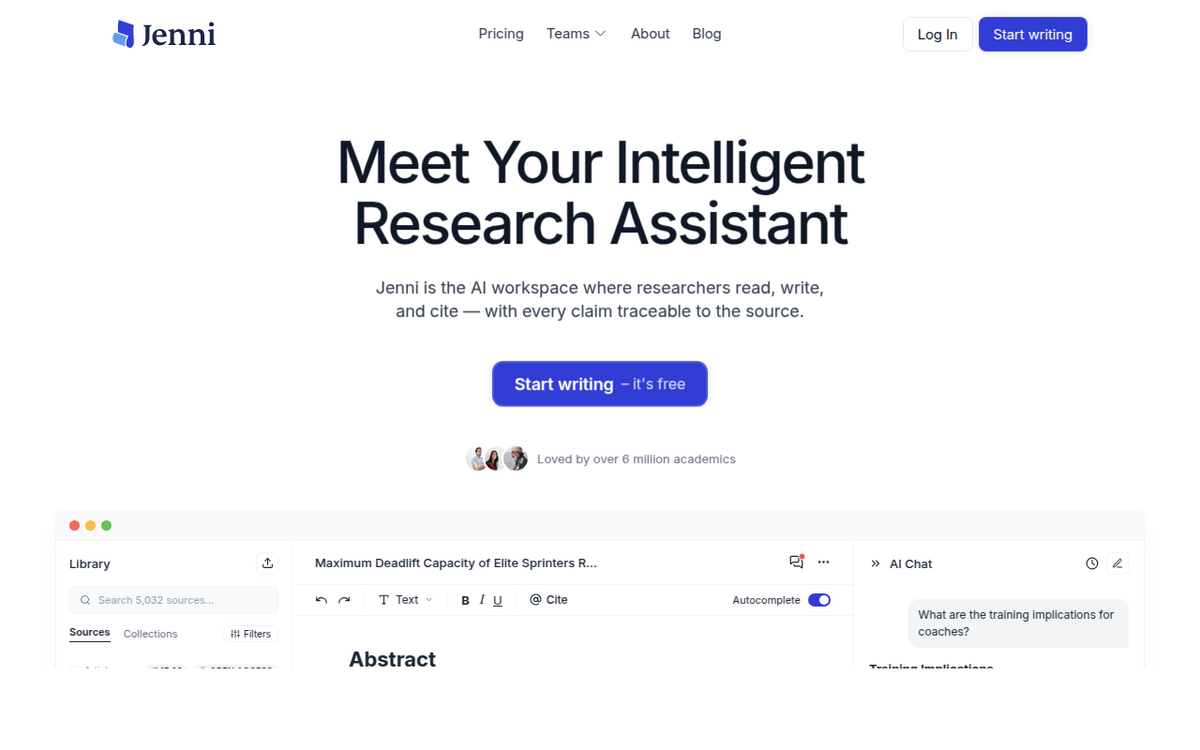
Jenni AI is a document editor built around one feature: AI Autocomplete, which predicts and writes your next sentence as you type, the way Gmail's Smart Compose does but tuned for academic prose. Around that sits a research library where you upload PDFs, an AI Chat panel that answers questions against whatever you've uploaded, an in-line citation tool that inserts references as you write, and a document-review scan that checks for plagiarism and flags weak claims. You write inside Jenni's own editor, not a plugin bolted onto Word or Docs, though a browser extension exists on the paid tiers.
That's a fundamentally different shape from a chat assistant. You don't ask Jenni a question and get an answer back; you sit inside a document and it keeps suggesting the next few words of your draft, which you accept, edit, or ignore. The company's own framing as of this review is "the AI workspace where researchers read, write, and cite," and it claims over 6 million academic users. That number isn't independently audited, and vendor user-count claims rarely are, so treat it as a marketing figure, not a verified metric.
Pricing, verified on Jenni's own page today
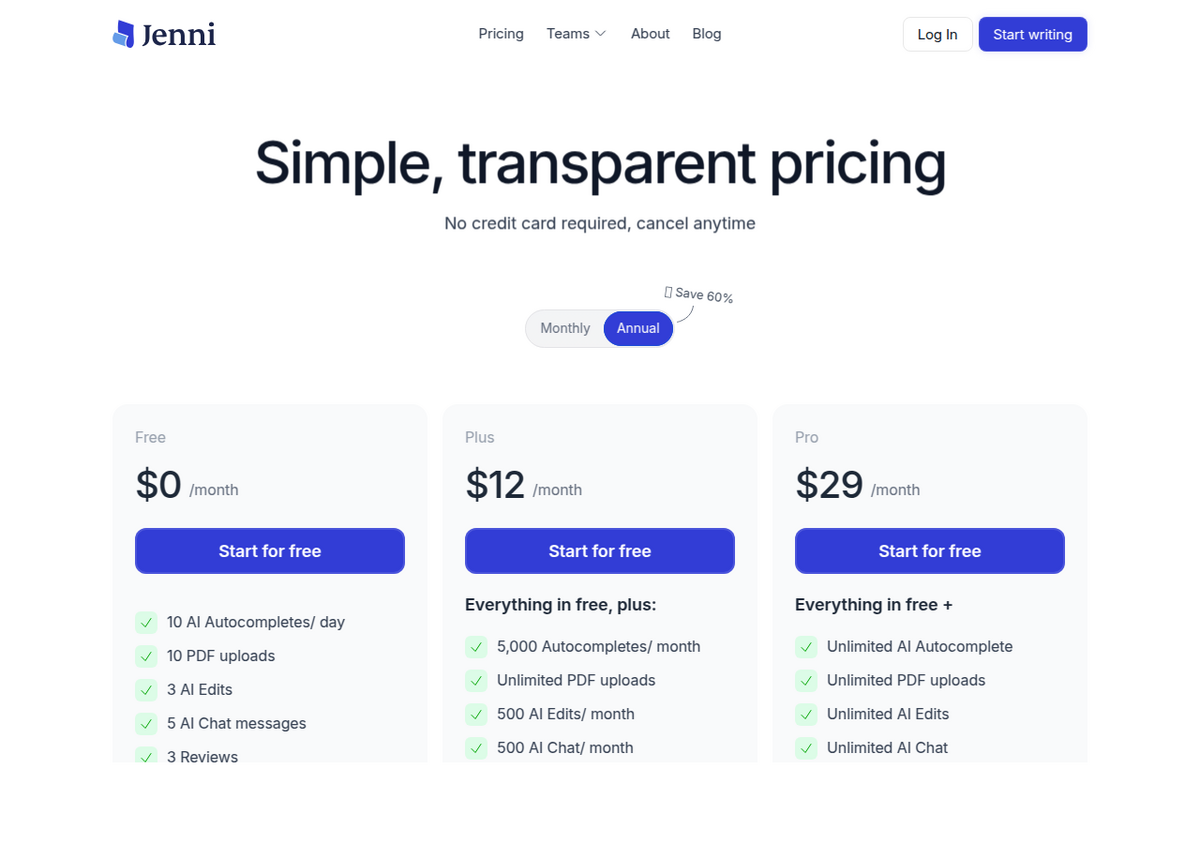
Here's the exact split, screenshotted directly from the pricing page today rather than pulled from a third-party listing, several of which currently disagree with each other and with Jenni's own numbers:
                     Free        Plus          Pro
------------------------------------------------------------------
Price                $0/mo       $12/mo        $29/mo
AI Autocomplete       10/day     5,000/mo       Unlimited
PDF uploads            10        Unlimited      Unlimited
Max PDF size          25 MB       100 MB        Unlimited
Max PDF pages          150         500           1,000
AI Edits                3        500/mo         Unlimited
AI Chat messages         5        500/mo         Unlimited
Document reviews         3        10/mo          Unlimited
Document export      Body text    Full doc       Full doc
Browser extension       No          Yes           Yes
Version history          No          Yes           Yes
Support               Limited     Live chat      Priority

Prices shown on jenni.ai/pricing with Annual billing selected
(page badges this "Save 60%" but does not display the monthly-
billing price on the same screen). Checked 4 September 2026.
Two things worth flagging before you sign up. First, the pricing page defaults to the Annual toggle and never shows you what monthly billing actually costs on the same screen, which is exactly the kind of ambiguity that shows up later as a Trustpilot complaint. Second, the free tier's export is capped to "body content only," meaning your title page, reference list, or appendix may not come along for the ride depending on format. Check this before you rely on it for a real submission.
Citation-style support is one of the few numbers that doesn't hold still: Jenni's own pricing table shows one figure, while independent reviews from GPTZero and Undetectable.ai both separately report over 2,600 citation styles. That's the number worth trusting since two unrelated third parties landed on it independently; treat any bigger figure you see elsewhere with some skepticism.
What it's actually good at
Set the marketing aside and the praise that recurs across independent reviews and user platforms is specific, not vague. The in-line citation insertion is the standout: instead of pasting a reference into a separate manager and formatting it later, you cite while you type and the reference list builds itself. Reviewers at GPTZero and Undetectable.ai both single this out as the genuine differentiator versus writing in ChatGPT or Claude and citing separately.
- Beating writer's block on a first draft. Autocomplete's real use case is momentum, not final prose: it gets a blank page moving, which several reviewers and Trustpilot's five-star cohort describe as the main reason they pay.
- PDF-grounded AI Chat. Upload your own sources and ask Jenni questions against them, closer to a research assistant than a generic chatbot, though it's meant to feed your draft rather than stand alone as a research tool.
- Editing commands. "Fix Flow Issues" and similar one-click edits get called out favorably in reviews as genuinely useful for tightening a rough paragraph without a full AI rewrite.
- One workspace instead of four tabs. For someone currently juggling a citation manager, Grammarly, ChatGPT and a plagiarism checker separately, Jenni consolidating that into one editor is a real time saving, not just a marketing line.
The complaints its testimonial page doesn't show you
Jenni sits at 3.6 out of 5 stars on [Trustpilot](https://www.trustpilot.com/review/jenni.ai) from 153 reviews, checked today. That average hides a polarized split: roughly 65% five-star against 23% one-star, with almost nothing in between. When a product's reviews cluster at the extremes like that, the one-star cluster is usually a specific, fixable, structural problem rather than a general quality complaint, and that's the case here: billing.
The recurring pattern, in reviewers' own words: unexpected charges after cancelling ("charging me after cancelling for 3 months, still struggling to cancel"), a cancellation flow some users say they couldn't find ("when I do I still cannot cancel it, there is no prompt or place to click on"), no renewal notification before the card gets charged, and slow support ("it's 7 hours later with no response"). G2 reviews echo the same shape: plenty of "life-saver" five-star praise for the writing workflow, alongside complaints about auto-renewal and, separately, about the tool "inventing stuff out of thin air."
Jenni's own refund policy confirms why this keeps happening rather than getting resolved case by case: "payments for Jenni AI subscriptions and enterprise licenses are not refundable" as the default position, with no stated refund window. The only exception is a suspected product bug, and even then you have to email support and schedule a call to demonstrate the issue before anything gets refunded. There's no self-service refund button and no fixed grace period. If you're charged and didn't mean to be, you're negotiating, not clicking a form. If you sign up, calendar the renewal date yourself; don't rely on the platform to remind you.
Does Jenni AI's own writing get flagged by AI detectors?
This is the question that matters most for the audience Jenni sells to, and it has a checkable answer rather than a vague one. GPTZero's own review says: "I ran the full 250-word output through GPTZero and found that 100% of the text was flagged as AI-generated." Separately, Undetectable.ai's review tested Jenni's output against its own detector (with Jenni's "human-like" writing setting turned on) and reports the raw output still fails to pass. Two unrelated detector companies, testing their own products against Jenni's raw output, both flagged it as AI-written.
That doesn't mean the tool is broken; it means grounded citations and undetectable prose are two unrelated problems, and Jenni only addresses the first. Autocomplete generates statistically AI-shaped sentences, the same as any LLM completion, and detectors are built to catch exactly that pattern. Citing your sources correctly inside that text doesn't change how the sentence itself reads to a classifier trained on token-level patterns. If your institution runs submissions through Turnitin, GPTZero, or a similar tool, and your policy treats undisclosed AI-drafted prose as misconduct, unedited Autocomplete output is a real, checkable risk. It isn't a hypothetical one. Our AI detector guide covers how reliable these tools actually are and where they get it wrong, which cuts both ways: false positives are real too, but 100% on unmodified output isn't a borderline case.
Citation accuracy: what "Claim Confidence" actually checks
Jenni's answer to the standard AI-hallucination problem is a feature it calls Claim Confidence, described on its own citation-checker page. It reads the full text of every cited source, not just whether a DOI resolves, cross-references through CrossRef, PubMed and OpenAlex, and sorts each in-text citation into one of six verdicts: Misrepresented, Contradicted, Unsupported, Weakly Supported, Overstated, or Unverifiable. It surfaces the actual passage from the source and proposes a rewrite that matches what the source really supports. That's a genuinely useful check, and it's more specific than a typical plagiarism scanner, which only asks whether text is copied, not whether a claim is true.
It's also, by construction, a check that runs *after* the fact. Jenni generates a sentence and a citation, then a separate pass tells you whether that citation actually holds up. The feature's own FAQ says it can produce false positives, which is why a flagged verdict can be dismissed by the user; it says it supports all languages, and it handles paywalled sources by having you upload the PDF to your own library rather than pulling from the open web, with an "Unverifiable" fallback for anything it truly can't access. Zulie Rane's review reports hallucinating a study on her very first attempt, and calls Jenni "a below-standard AI text generation tool," though she adds it "may be worth it for some specialist academic edge cases." Effortless Academic's review, by contrast, calls the in-document citation workflow a genuine differentiator from ChatGPT and Perplexity. Both can be true at once: the mechanism for catching a bad citation exists and works often enough to be useful, but it's a safety net under a tower that generates first and verifies second, not a structural guarantee that nothing false gets written in the first place.
Jenni AI vs Gemini Notebook: two different jobs, and why that matters for academic integrity
This is the comparison Jenni's marketing language is now edging toward without making explicit, and it's worth being precise about, because getting it wrong has real consequences for a student weighing what their honor code actually permits.
Jenni is a generation tool. Its central feature, the one every pricing tier meters, writes sentences of your essay for you. The citation and Claim Confidence layers exist to catch problems in that generated text after the fact. Gemini Notebook is a retrieval tool: you upload sources, ask a question, and it answers only from what you gave it, with an inline citation on the claim before you ever see the sentence. There is no separate "check the citation afterward" step, because the constraint is built into how it answers at all. It does not draft your essay's prose. Ask it to write your introduction and it will decline or produce something explicitly framed as a starting point to rewrite, not a submittable paragraph.
                    Jenni AI                    Gemini Notebook
--------------------------------------------------------------------------
Core job            Writes your draft's           Answers questions about
                     sentences for you             sources you chose
Writes your prose?  Yes - that's the product       No - by design
Citation timing     Generated, then checked        Attached at answer time
Source scope        Uploaded PDFs + open web       Only sources you added
Entry price          $0 (10 autocompletes/day)     $0 (Google account)
Paid from            $12/month                     Bundled in Google AI
                                                     plans from $4.99/month
Best for             First-draft momentum,          Verifying what a set of
                      citation formatting            documents actually say
Academic-integrity   Generated prose = your          Your own synthesis of
  posture             institution's AI-use policy    cited answers, written
                       applies directly               by you
That last row is the one that actually decides which tool you should reach for. If your school's policy (like most) treats AI-generated prose submitted as your own work as misconduct regardless of how well it's cited, Jenni's core feature sits squarely inside that risk: a citation being accurate doesn't change who wrote the sentence around it. Using Gemini Notebook to understand and organize your sources, then writing your own synthesis in your own words, is a materially different act, because the tool never produced the submitted sentence at all. Our essay-writing FAQ covers that boundary directly for Gemini Notebook; the short version is that it can technically be prompted into essay-shaped text, but that's misusing a citation tool for a job it wasn't built for and actively resists.
None of this makes Jenni AI a bad product for what it is. A student who understands the line, uses Autocomplete to break through a blank page, then substantially rewrites in their own voice before submitting, and treats Claim Confidence as a second check rather than a first line of defense, is using it about as safely as this category of tool allows. The risk shows up when the tool's own "grounded, traceable" framing gets read as a guarantee that the output is safe to submit as-is. It isn't, and the detector tests above show exactly why.
A worked example: drafting a section the way Jenni is meant to be used
The homepage screenshot above shows the actual layout: a source library on the left (search across your uploaded PDFs), the document editor in the middle, and an AI Chat panel on the right. A realistic workflow looks like this. You upload the five to ten papers your section draws on into the library. You write a heading (say, "Training Implications") and start a sentence; Autocomplete offers a completion pulled from patterns in academic writing generally, not necessarily your uploaded sources unless you've prompted it to ground the suggestion. You accept, reject, or edit each suggestion line by line. When you need a citation, you type @Cite inline, search your 5,000-plus-source library (Jenni's own example workspace shows over 5,000 sources indexed), and insert the reference without leaving the document. Once a full draft section exists, you run a document review; Claim Confidence checks each in-text citation against the actual source text and flags anything Misrepresented, Contradicted, or Unsupported for you to fix before it reaches a professor or a journal.
The honest failure mode in that workflow isn't the citation step, which the evidence above says works reasonably often. It's the temptation to accept several Autocomplete suggestions in a row without heavily editing them, because that's the fastest way to a finished-looking draft. It's also the fastest way to a draft that reads as 100% AI-generated to the exact tools your institution may already be running your submission through.
When NOT to use Jenni AI
- If your institution's policy bans AI-generated prose outright, regardless of citation quality. Autocomplete's output is the product; there is no way to use the core feature without producing AI-written sentences, and the detector results above say those sentences are catchable.
- If you need current, open-web information. Jenni's citation and chat features work against your uploaded library; it isn't built as a live research or fact-checking engine the way Perplexity or ChatGPT's browsing mode is.
- If you want a tool that verifies before it generates, not after. That's Gemini Notebook's actual design, not Jenni's. See the comparison above. If the job is "tell me what these ten PDFs actually say, with proof," that's the better-suited tool.
- If billing transparency matters to you and you won't remember to cancel manually. The Trustpilot pattern here is specific and repeated enough that it isn't bad luck: budget for the fact that cancellation and refunds are not straightforward on this platform.
- If you're choosing based on the free tier's usable volume. Ten Autocompletes and five AI Chat messages a day is enough to trial the product, not to draft a real paper; you'll hit the wall within a session or two and need to decide on Plus before you've fully evaluated it.
Verdict
Jenni AI does one thing competently: it keeps you moving on a first draft and handles citation formatting inside the document instead of as a separate chore, and its Claim Confidence layer catches a meaningful share of citation problems after the fact. The billing and refund complaints on Trustpilot are real, specific, and repeated often enough to plan around rather than dismiss as noise. The detector results are the most important finding here: two independent tools, testing their own detection against Jenni's own output, both flagged it, one with an exact 100% score, which means the "grounded, traceable" pitch covers the citations, not the sentences.
For someone who wants an AI co-writer for a first draft and understands they'll heavily rewrite before submitting, it's a reasonable $12-a-month tool with a genuinely useful citation workflow. For someone hoping "traceable to the source" means the output is safe to submit unedited, or safe from AI-use policies because the citations check out, it isn't, and conflating those two things is the actual risk. If your task is closer to "understand what my sources say" than "draft new sentences," Gemini Notebook is built for that job specifically and doesn't carry the same generated-prose exposure at all.
People also ask
Is Jenni AI free?
Yes, with real limits: 10 AI Autocompletes a day, 10 PDF uploads, 3 AI Edits, 5 AI Chat messages, and 3 document reviews, checked on jenni.ai/pricing. That's enough to trial the product for a session or two, not to draft a full paper. Paid tiers start at $12/month (Plus) and $29/month (Pro).
Does Jenni AI's writing get flagged by Turnitin or other AI detectors?
Independent tests say yes at a high rate. GPTZero's own review found a 250-word Autocomplete sample came back 100% AI-generated. Undetectable.ai's review found a sample failed its detector even with Jenni's "human-like" setting enabled. Citing sources accurately doesn't change how the generated sentences themselves read to a detector.
Is Jenni AI safe to use for academic writing without getting flagged for plagiarism or AI misconduct?
It depends entirely on your institution's policy and how much you edit the output. Jenni's core feature generates prose; if your school treats undisclosed AI-generated text as misconduct regardless of citation accuracy, unedited Autocomplete output falls inside that risk. Using it for a first draft you substantially rewrite in your own words is a materially safer pattern than submitting its output directly.
What's the difference between Jenni AI and Gemini Notebook (formerly NotebookLM)?
Jenni writes your essay's sentences for you and checks the citations afterward. Gemini Notebook never writes your paper: it answers questions about sources you upload, with the citation attached to the answer before you see it, not verified after the fact. For drafting prose, that's Jenni's job. For understanding and citing what a set of documents actually says without generating new sentences, that's Gemini Notebook's job.
Why does Jenni AI have so many negative reviews on Trustpilot?
Jenni sits at 3.6 out of 5 from 153 Trustpilot reviews, with a polarized split around 65% five-star and 23% one-star. The one-star reviews center on billing: unexpected auto-renewal charges, a cancellation flow some users report as hard to find, and a refund policy that is non-refundable by default except for demonstrated product bugs, per Jenni's own refund page.
ส่งออก NotebookLM ของคุณได้ในคลิกเดียว
ส่วนขยาย Chrome ฟรี รองรับ PDF, Word และ Markdown ประมวลผลบนเครื่องของคุณเอง — ไม่มีการอัปโหลด