The NotebookLM desktop app doesn't exist. Here's what to install instead
Search for a NotebookLM desktop app and you get download buttons from five different sites. None of them are Google's. One is worth using, two are harmless but pointless, and one is an ad-wall that never tells you what file you're about to run. Here's the honest map.
NotebookLM was renamed Gemini Notebook in July 2026, and the web app moved to notebook.google.com. Both names describe the same product, and the desktop situation below is identical either way.
Google does not make a desktop app for NotebookLM / Gemini Notebook, on Windows, Mac or Linux. The only official clients are the website and the Android and iOS apps. What you actually want is to install the website as a desktop app: in Chrome, ⋮ → Cast, save, and share → Install page as app…. That gives you a real window in your dock or taskbar, its own icon, and no browser tabs, which is what most people mean when they search for this. It takes about ten seconds, involves no third party, and cannot break.
Everything else offering a "NotebookLM download" is someone else's software wrapped around the same website.
The confusion is Google's fault, and it has a name
There is an official Google desktop app called Gemini. It is not this product.
Google shipped a native Gemini app for macOS in April 2026, needing macOS 15 or later on Apple Silicon, and followed with a Windows 10/11 version on 10 September 2026, adding an Alt+Space global launcher, Gmail- and Drive-grounded drafting, and Nano Banana image generation. Both put the Gemini chat assistant behind a global keyboard shortcut. People install it, open it, go looking for their notebooks and find nothing, because the Gemini app is the general-purpose assistant while Gemini Notebook is the source-grounded research tool. Shared brand, different products, and the Windows launch confirms it: Google's own announcement doesn't mention Notebooks once.
So when someone tells you "the Gemini desktop app exists," they're right, and it doesn't help you. Your notebooks live on the web.
What Google actually ships
Three surfaces, and it's worth being precise about them, because the third-party pages muddy this deliberately:
- The web app at notebook.google.com. This is the full product. Every feature lands here first, and some never leave.
- Android, package
com.google.android.apps.labs.language.tailwind. The package name still carries "tailwind," the original internal codename, a decent reminder of how much has been renamed around this product without the plumbing changing. - iOS and iPadOS, App Store ID
6737527615, requiring iOS 17 or later. Both mobile apps launched on 19 May 2025 and were rebranded in place during the July 2026 rename: same listings, same IDs, new name.
Google's own support documentation describes computer access as browser-based, and there is no Workspace Updates post, blog entry or help-centre note anywhere announcing a desktop client or promising one. That absence is the answer. If a desktop app were coming, this is a company that would have said so.
The mobile apps are also narrower than the web version: no note creation, no mind maps, no data tables. What works and what's missing on mobile covers that split in detail.

Install the web app as a desktop app
This is the route almost everyone searching for a download actually wants. A modern browser can install a website as a standalone application: its own window with no tab strip and no address bar, its own icon in the Start menu or Dock, its own entry in Alt-Tab and Cmd-Tab. Functionally it is a desktop app. Nothing is downloaded from a third party, and the thing running inside it is the real product rather than someone's copy of it.
Chrome (Windows and macOS)
- Open notebook.google.com and sign in.
- Open the ⋮ menu at the top right, choose Cast, save, and share, then Install page as app…. Chrome reorganized this menu in 2024, so if you're following an older tutorial that says "More tools → Create shortcut," that path is gone.
- Faster alternative: when a site qualifies, Chrome shows a small install icon in the address bar, just left of the bookmark star. One click, then Install.
- Name the window (the default is fine) and confirm. You get a Start-menu or Applications entry, and you can pin it like any other app.
Edge (Windows and macOS)
- Open notebook.google.com and sign in.
- Click the App available icon in the address bar (a small monitor with a downward arrow), or go to ⋯ → Apps → Install this site as an app.
- Confirm. Edge additionally offers to pin the app to the taskbar and to launch it at login, which is the closest thing to native behaviour available here.
What this gets you, and what it doesn't
Gets you: a dedicated window that survives closing your browser, a taskbar icon that doesn't get lost among thirty tabs, and separation from whatever else is eating your browser's memory. Notebooks with a lot of sources feel meaningfully better in their own window, mostly because you stop accidentally navigating away from them.
Doesn't get you: offline access, faster performance, or any feature the website lacks. An installed web app is the website. It is not a lighter or quicker version of it, and it does not cache your notebooks for the train.

The third-party wrappers, ranked by how much I'd trust them
Everything in this section is someone else's software displaying Google's website. That isn't automatically bad, but you should know that's what you're installing, because none of these pages lead with it.
The open-source Electron app: now active again, with caveats
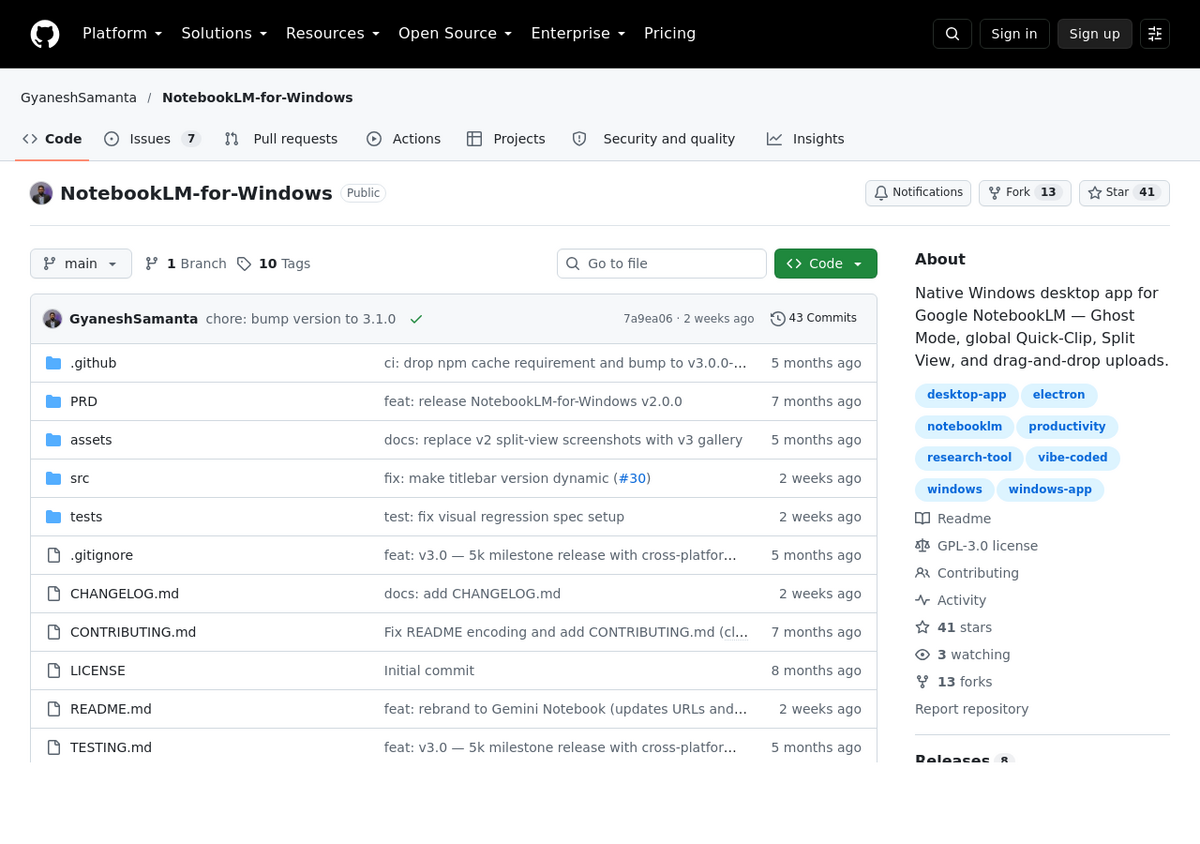
NotebookLM-for-Windows is a community project on GitHub, GPL-3.0 licensed, built on Electron. It's the only wrapper I'd consider, for one reason: the source is public, so "this just loads the website" is a claim you can verify rather than trust. When this article first ran, that project had gone quiet since May; that's no longer true, and it's a good illustration of how fast one of these small projects can flip from stale to active.
It adds things the browser route doesn't have: a global clip shortcut, a configurable multi-pane grid for comparing several notebooks at once, dark mode, a settings panel and customizable hotkeys. Despite the name it also ships macOS and Linux builds. As of today: version 3.1.0, released 6 October 2026, 41 stars, 13 forks, 7 open issues. A dedicated pull request merged the same day rebranded the project's own installer artifacts to "Gemini-Notebook-for-Windows," and its README now references only notebook.google.com, with no mention of the old notebooklm.google.com address left in it. That's a meaningfully more actively maintained project than it was two months ago, though the repository's own topic tags include a "vibe-coded" label, worth knowing if that affects how much you trust unreviewed AI-assisted commits.
Practical warnings still apply: the builds aren't code-signed, so Windows SmartScreen and macOS Gatekeeper will both object, and clicking through those warnings is a habit worth keeping rare. It's still a single maintainer's side project, not a funded product, so a quiet stretch like the one between May and October can happen again.
Multi-account browsers: fine, but that's not what they're selling you
Wavebox and WebCatalog both rank for "NotebookLM desktop app" and both offer a download. Neither is a NotebookLM product. They're container browsers that hold many web apps at once, built to wrap any URL you give them, so they work against notebook.google.com the same way they'd work against any site, whether or not either company has gotten around to updating a specific catalogue listing. WebCatalog at least states plainly that it isn't affiliated with or endorsed by Google.
There is one real use case: running several Google accounts side by side. If you juggle a personal notebook and two work accounts, a container browser handles that better than Chrome profiles do. If you don't, you're installing an entire browser to get a window you could have made in ten seconds.
A newer entrant worth a specific warning: GeminiDesktop.app, a commercial Tauri-based wrapper in beta, marketed as "the only real native" Gemini Notebook desktop option, priced free with your own API key or $20 for a bundled Pro tier. Its own marketing page gives no installer checksums, no company name, and no contact information, and links out to an unofficial, reverse-engineered API client. None of that makes it malicious, but none of it is verifiable either, and it's asking for payment. Treat it the way you'd treat any unaudited paid tool asking for your Google account: with more scrutiny than a free, open-source one gets.
The "free download" pages: close the tab
Softonic and its lookalikes rank well for this query, and they're the reason this article needed writing. Their NotebookLM page has a Free Download button. It does not host an installer. The page itself admits you'll be redirected to an external website to complete the download, and gates the click behind an ad view, so you are being sent to an undisclosed third party, for an unnamed file, after watching an advert.
The listing details give it away if you read them. The version field reads "varies-with-devices," which is not a version. No file size is given. No installer is named. No publisher is identified. The page simultaneously reports "Not for your OS" and lists Windows 11 in its specifications. There is nothing legitimate to download here, because Google makes nothing to distribute. The page exists to monetize a search term, and whatever sits at the end of that redirect chain is nobody's responsibility.
The rule generalizes well beyond this one site: a download page that won't name the file, the version or the publisher isn't distributing software. It's selling your click.
Android emulators: technically possible, genuinely bad
BlueStacks and similar emulators surface for these searches with instructions for running the Android app on a PC. It works. It also means running a virtualized Android system, several gigabytes of it, to reach a mobile app that is more limited than the website you already have open: no mind maps, no note creation, no data tables. You would be spending real resources to lose features. The only scenario where this makes sense is testing the mobile app itself.
The URL move just put every wrapper on a timer
This is the part the other pages on this topic haven't caught up with, and it's the strongest argument for the browser route.
In late July 2026 the app's address changed from notebooklm.google.com to notebook.google.com. Google never announced it. The old address currently answers with a redirect, so most things still work, and as of this month that redirect got more permanent, not less: a live check today returns an HTTP 301 (permanent redirect), upgraded from the 302 (temporary redirect) this article originally found in August. Oddly, Google still pairs that 301 with no-cache headers, so it hasn't fully committed to browsers caching it either, but the status code itself is a real, verifiable change and a sign the old address isn't coming back as a primary URL.
A wrapper is a shell pointed at a hardcoded address, and any project that declares browser-extension-style host permissions against the old domain only can fail silently, showing a window that never loads, if a redirect it depends on is ever removed. That risk is still real in principle. In practice, the Electron project above is the proof of both directions: it went quiet for months after the URL moved, then its maintainer pushed a same-day fix in October that rebranded the whole project and pointed its README exclusively at the new domain. An installed web app never has this problem at all: it follows whatever the live address is, because it is your browser.
None of this gets you offline access
Worth stating plainly, because "desktop app" and "works offline" are the same wish for a lot of people searching this. Gemini Notebook does its work on Google's servers: your sources are indexed there, your questions are answered there. No local client changes that. Installing the web app adds no offline cache, the Electron wrapper has no offline mode, and the emulator route certainly doesn't.
The one genuine exception is on mobile, where downloaded Audio Overviews play without a connection, and only inside the app, not as files you can move. What works offline has the full picture. If your actual requirement is reading your material on a plane, the answer isn't a desktop app, it's exporting the content before you board.
When not to bother with any of this
If you open a notebook twice a month, a bookmark is fine. The installed-app route earns its ten seconds when Gemini Notebook is somewhere you live daily, or when you keep losing it in a wall of tabs. The wrapper route earns its risk in exactly one case (several Google accounts open at once) and none otherwise.
And if what you're really after is your notebooks in a file you own, on a disk you control, no client of any kind solves that: it's an export problem. The NotebookLM to PDF exporter pulls notes and chats out as PDF, Word or Markdown with citations intact, which travels considerably better than any window ever will.
People also ask
Is there an official NotebookLM desktop app for Windows or Mac?
No. Google ships NotebookLM (now Gemini Notebook) as a website plus Android and iOS apps. There is no official Windows, macOS or Linux application, and Google has never announced plans for one. Install the website as an app through Chrome or Edge to get a standalone desktop window.
Isn't there a Gemini desktop app I can use?
There is, and it's a different product. The Gemini app for Mac and Windows is Google's general-purpose chat assistant. It does not contain your notebooks or any Gemini Notebook features: those live only on the web and in the mobile apps.
How do I install NotebookLM as an app on Windows 11?
Open notebook.google.com in Chrome, then use ⋮ → Cast, save, and share → Install page as app…, or click the install icon in the address bar. In Edge, use the App available icon or ⋯ → Apps → Install this site as an app. Either creates a Start-menu entry and a standalone window you can pin to the taskbar.
Is the NotebookLM for Windows app on GitHub safe?
It's open-source under GPL-3.0, so the code can be inspected, which puts it well ahead of the anonymous download sites. As of October 2026 it's actively maintained again (v3.1.0, 41 stars, rebranded to reference Gemini Notebook directly), after a quiet stretch between May and October. The builds are still unsigned, so your operating system will warn you, and it remains a single maintainer's side project, not a supported client, so treat it accordingly.
Can I use NotebookLM offline on my computer?
No. Every AI feature runs on Google's servers, so all of them need a connection, and no desktop wrapper or installed web app changes that. The only offline capability anywhere is downloaded Audio Overviews playing inside the mobile app.
Why do sites like Softonic offer a NotebookLM download?
Because the search term is valuable. Those pages don't host a NotebookLM installer. Google doesn't make one. They show an advert and redirect you to an external site without naming the file, the version or the publisher. There is nothing legitimate to download, so close the tab.
NotebookLM'inizi tek tıkla dışa aktarın
Ücretsiz Chrome uzantısı. PDF, Word ve Markdown. Kendi makinenizde işlenir — hiçbir şey yüklenmez.