NotebookLM for literature reviews: the four-pass workflow
Fifty papers and a deadline is the situation NotebookLM was built for. This is the pass structure that turns a pile of PDFs into a synthesis instead of an annotated bibliography, and where the process still needs you.
NotebookLM was renamed Gemini Notebook in July 2026. This guide covers the same product under its new name — everything below still applies whether you know it as NotebookLM or Gemini Notebook.
A literature review is not fifty summaries stapled together. It is an argument about where a field agrees, where it splits, and what nobody has checked yet. NotebookLM is good at the first draft of that argument and bad at the parts that need judgment, so the workflow below deliberately keeps you in the loop at the two steps that matter most.
The four passes
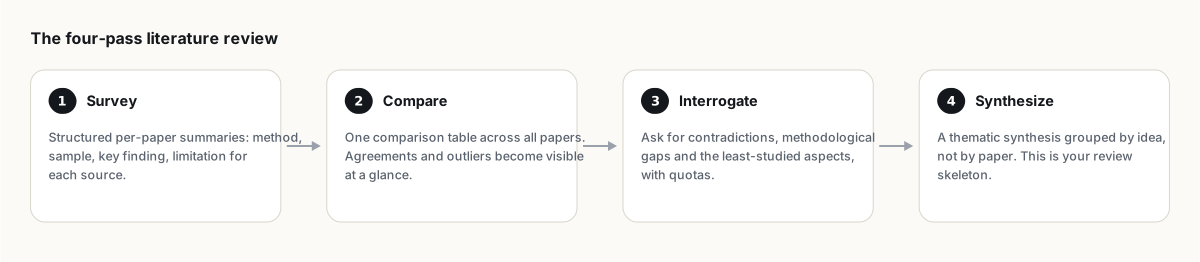
Pass 1: survey
Upload papers in batches (see source limits if you are past fifty) and ask for a structured summary per paper: method, sample or scope, key finding, stated limitation. Save the result as a note. This pass is mechanical and safe to trust; it is retrieval, not interpretation.
Pass 2: compare
Build a comparison table across my sources. Columns: paper, method, sample size, key finding, limitation. Mark anything not stated as 'not in source' rather than guessing.The table makes patterns visible that no amount of individual reading does: which methods cluster, which findings recur, which single outlier paper everyone else contradicts. This is where you actually start understanding the field, not just cataloguing it.
Pass 3: interrogate
Identify gaps across my sources: 5 unanswered questions, 3 methodological weaknesses shared by multiple papers, 2 direct contradictions, and 1 assumption nobody examines.The numeric quotas are load-bearing. Without them the model defaults to "more research is needed," which says nothing. With them you get a working list that maps directly onto your introduction's "gap" paragraph. Also worth running: "Compare my sources and find every disagreement, with which source takes each side and how strong the evidence is."
Pass 4: synthesize
Ask for a thematic synthesis grouped by idea rather than by paper: "Group my sources into 4 to 6 themes. For each theme, summarize the consensus, note who disagrees and why, and cite every claim." This output is a draft outline for your review's body, organized the way a real literature review is organized, not the way a reading log is organized.
Where you stay in the loop
- Inclusion decisions. NotebookLM has no concept of a systematic review protocol, PRISMA criteria or study quality thresholds. Which fifty papers belong in the review is your call, made before upload.
- Every citation that lands in your draft. The accuracy guide routine applies with extra force here, since a misattributed claim in a published review is a real problem, not an inconvenience.
- The actual argument. Synthesis output is a strong first draft, not a finished section. The throughline connecting your themes into a case is still yours to write.
Filling gaps with Deep Research
If pass 3 surfaces an under-covered angle, Deep Research can go find more papers on it directly from a description of the gap, importing a cited report you then fold into the same corpus. It is not a replacement for a proper database search, but it is a fast way to check whether an angle is worth a real search before you commit an afternoon to it.
Save every pass as a note as you go; losing pass 2's comparison table two days before a deadline is not a risk worth taking. Back up the notebook periodically, and export the final synthesis with citations intact via NotebookLM to PDF or to Word for the actual manuscript.
FAQ
Can NotebookLM do a full literature review for me?
It accelerates the mechanical parts, summarizing, comparing, drafting a thematic outline, but inclusion criteria, quality judgment and the final argument still require you. Treat outputs as a strong first draft.
How many papers can I load into one review notebook?
50 on the free plan, up to 300 on Pro, each up to 500,000 words. Merging related papers or using Google Docs tabs stretches that further; see source limits.
Is this suitable for a systematic review with PRISMA reporting?
Not on its own. NotebookLM has no built-in protocol for inclusion/exclusion tracking or quality appraisal. Use it for synthesis after you have applied your own systematic review methodology to select papers.
Is NotebookLM the same as Gemini Notebook?
Yes. Google renamed NotebookLM to Gemini Notebook in July 2026 — it's the same product, same features, just a new name.
Wyeksportuj swój NotebookLM jednym kliknięciem
Darmowe rozszerzenie do Chrome. PDF, Word i Markdown. Renderowane na Twoim urządzeniu — nic nie jest wysyłane.