NotebookLM not working? Here's what's usually wrong
One sentence: most NotebookLM problems trace back to one of four causes, a bad source, too many sources selected at once, a browser extension, or navigating away mid-generation, and each has a specific fix.
NotebookLM was renamed Gemini Notebook in July 2026. This guide covers the same product under its new name — everything below still applies whether you know it as NotebookLM or Gemini Notebook.
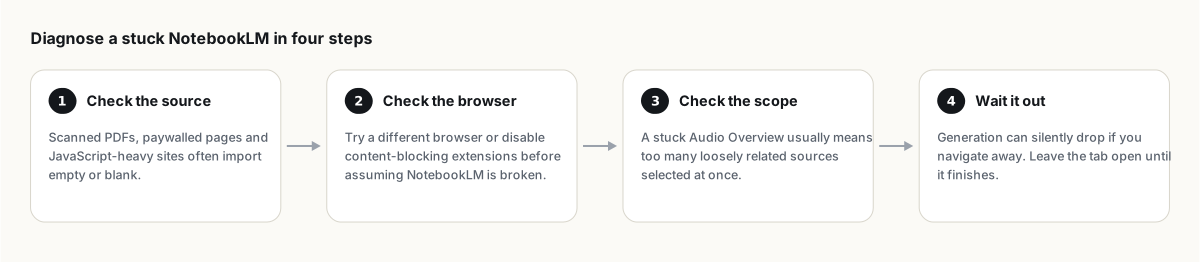
Before assuming NotebookLM is broken, check the source you just added (scanned PDFs and paywalled pages commonly fail silently), try a different browser or disable content-blocking extensions, and reduce how many sources are selected for a slow or stuck generation. Most "not working" reports trace back to one of these, not an actual outage.
"My source imported blank or empty"
This is almost always the source, not NotebookLM. Common causes: a scanned PDF with no selectable text layer (NotebookLM cannot read an image of text without OCR), a website that renders its content with JavaScript after the page loads (the crawler only reads the initial HTML), or a paywalled or login-required page. Run OCR on scans first, or copy the visible text and paste it in as a text source instead of the URL.
"My PDF won't upload at all"
Check the size: sources are capped at roughly 500,000 words or 200MB. A document over that either fails to upload or imports incompletely. Split it into smaller files, or trim to the sections you actually need. Full detail in the word limit per source page.
"Audio Overview generation is stuck"
Two likely causes. First, too many loosely related sources selected at once; NotebookLM's audio quality and reliability both improve noticeably when you scope down to five to ten genuinely relevant sources with the source checkboxes, rather than everything in the notebook. Second, navigating away from the tab: generation can silently lose progress if you close or switch away before it finishes. Leave the tab open and let it complete.
"The interface is frozen or blank"
This is usually the browser, not NotebookLM's servers. Try a different browser (Chrome, Edge, Firefox), disable ad blockers or privacy extensions one at a time to find the culprit, and clear the site's cache if switching browsers fixes it, confirming a local caching issue.
"It gave me a wrong or weird answer"
That is not a bug to troubleshoot, it is accuracy behaving the way it sometimes does. Click the citation behind the claim to see the actual source passage. The citations and accuracy guide covers why this happens and a quick verification routine.
If none of this is it
A genuine Google-side outage is real but rare, and unlike most of the causes above, it is out of your control entirely; a quick search for current status reports will confirm or rule that out in seconds. For anything else, Google's own NotebookLM help center has the official troubleshooting steps for edge cases not covered here.
People also ask
Why does NotebookLM say it can't answer my question?
This usually means your selected sources genuinely don't cover the topic, which is intended behavior, not a bug; NotebookLM is designed to decline rather than guess. Check that the relevant source is actually selected.
Why is NotebookLM so slow today?
Slow responses are usually tied to generating a complex output like Audio or Video Overviews with many sources selected, which genuinely takes minutes. Persistent slowness across all actions may indicate a temporary Google-side issue.
Can I recover a notebook I accidentally deleted?
There is no built-in undo for a deleted notebook. This is exactly why keeping a regular backup habit matters for anything you can't afford to redo.
Is NotebookLM the same as Gemini Notebook?
Yes. Google renamed NotebookLM to Gemini Notebook in July 2026 — it's the same product, same features, just a new name.
Esporta il tuo NotebookLM in un clic
Estensione gratuita per Chrome. PDF, Word e Markdown. Elaborata sul tuo dispositivo — niente viene caricato.