NotebookLM for students: the exam prep workflow
The trap with AI study tools is that they make passive review feel productive: beautiful summaries you read once and forget. Set up correctly, NotebookLM does the opposite and forces you to retrieve, explain and get graded. Here is the setup.
NotebookLM was renamed Gemini Notebook in July 2026. This guide covers the same product under its new name — everything below still applies whether you know it as NotebookLM or Gemini Notebook.
Setup: one notebook per course
Resist the everything-notebook. One notebook per course, named properly, containing lecture slides, your own notes, assigned readings, recorded lectures (as YouTube links or audio files) and, if you can get them, past exams. Past exams are the highest-value source in the whole stack, because generated questions start mimicking your professor's actual style. Rename sources as you add them: Week 4 - Enzymes lecture beats slides_final(2).pdf in every downstream feature.
The two-week ramp
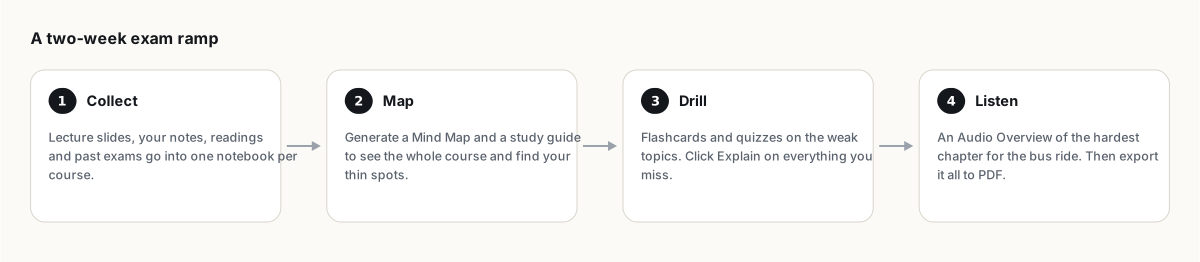
- Days 14 to 10: map the territory. Generate a mind map and a study guide across all sources. Collapse the branches you already know cold. What remains expanded is your actual syllabus.
- Days 10 to 4: drill, don't re-read. Quizzes on hard difficulty, scoped to one weak topic at a time via the source checkboxes. Click Explain on every miss and read the cited passage. Retake missed-only until it is boring.
- Days 4 to 2: take a realistic mock. Prompt: "Generate a practice exam matching my past exams: same question styles, same topic weighting, with an answer key citing sources." Sit it under time pressure, on paper if the real exam is on paper.
- Days 2 to 0: review light. An Audio Overview of your weakest chapter for the commute, prompted with "the listener sits this exam tomorrow, quiz each other on key definitions." No new material on the last day; that is anxiety, not studying.
The prompts that force retrieval
Retrieval practice, recalling material rather than re-reading it, is one of the most consistently supported findings in learning research. Three prompts operationalize it:
- The examiner: "Ask me 15 questions on [topic], one at a time, increasing difficulty. Grade each answer against the sources and tell me exactly what I missed."
- The teach-back: "I'll explain [concept] in my own words. Act as a skeptical student: one basic question, one follow-up that tests real understanding, one edge case. Then critique my explanation."
- The weakness scan: "Compare my own notes against the lecture slides. Where are my notes sparse, where do I copy the source verbatim (a sign I didn't understand), and which prerequisite concepts am I missing?"
Also try Learning Guide mode in chat settings, which turns the chat into a tutor that asks rather than tells. It is slower than getting answers, which is precisely the point.
Honesty section: where it can hurt you
- Answers are only as correct as your sources plus a small error rate on top. For anything that decides marks, click the citation. The accuracy guide has the one-minute routine.
- Summaries feel like studying and mostly are not. If your NotebookLM time is reading rather than answering, you have rebuilt the highlighter, just fancier.
- Free-tier limits are per day (50 chats, 3 audio, 10 quizzes), so the night-before cram session hits walls. Spread the work; your memory prefers that anyway.
Phones stay outside, and so does NotebookLM. Export your study guide to PDF for offline review, or print it; the printing guide covers getting clean paper copies of anything in your notebook.
FAQ
Is NotebookLM good for exam preparation?
Yes, with the right usage pattern: quizzes, examiner prompts and teach-back rather than passive summary reading. Feeding it past exams makes generated questions match your professor's style.
Can NotebookLM work from my recorded lectures?
Yes. Upload audio files or link public YouTube recordings; transcripts become queryable sources with citations pointing at the right moments.
Is NotebookLM free for students?
The free tier covers a full course load: 100 notebooks, 50 sources each, 50 chats and 10 quizzes daily. Students 13 and over can use it, and some universities provide upgraded access through Education accounts.
Is NotebookLM the same as Gemini Notebook?
Yes. Google renamed NotebookLM to Gemini Notebook in July 2026 — it's the same product, same features, just a new name.
Esporta il tuo NotebookLM in un clic
Estensione gratuita per Chrome. PDF, Word e Markdown. Elaborata sul tuo dispositivo — niente viene caricato.